Fixes (Effects and Extras changes only apply to DNA):
* Improved preloading of clip banks
* Better ohm64/block integration: it used to be that the block and ohm would reprogram DNA's midi settings. It is now "non-invasive" so any midi settings (except for the "main port") are left untouched when a block/ohm is detected
* Gave captions more size flexibility
* Captions and Freeframe popup window won't appear on 2nd monitor.
* "Melt" effect is way way cooler
* "SoundWave" Extra for audio waveform drawing
* New effects: hallofmirrors, darkfog, panes, scrollx, scrolly, windows
* Improvements to multiscreen - you can turn it off to have a single movie stretched across all screens, then turn it on again for multi-screen.
* More Controls Extra supports an alternate midi port, allowing for a different controller to send data to control the knobs/buttons.
* improved interface to MultiScreen
* ExtraMIDI Extra allows for clip selection from a different port (made this as a sort of a gesture to a user, but it is useful)
* fx are turned off when you change the fx preset
* Fixed bug where clip bank was not saved properly if a clip is dragged to a position less than current position when in "edit" mode
* MIDI Program changes can be enabled to change banks of clips
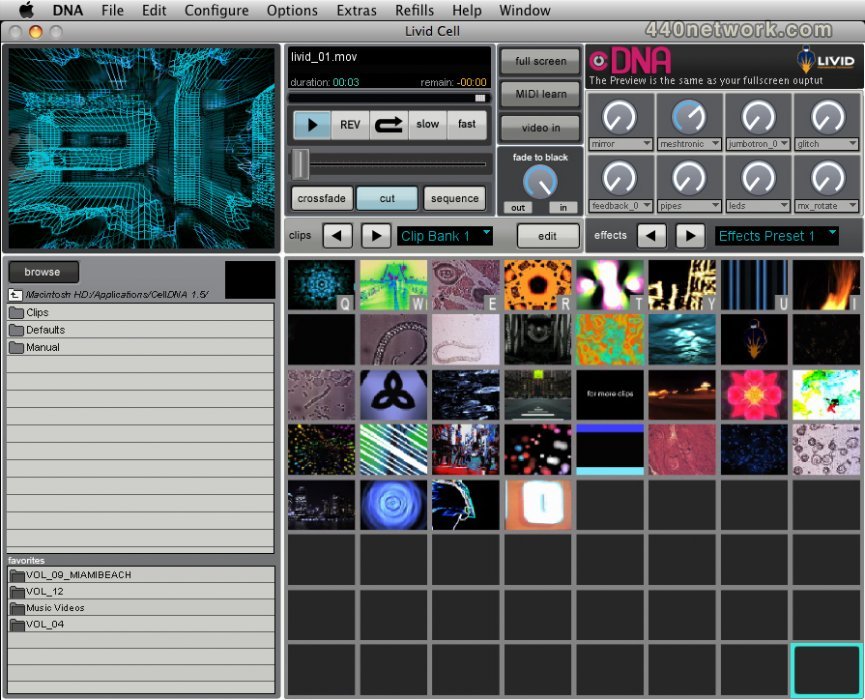
* Got rid of Defaults folder. All defaults are stored in the package Contents or support/ folder, and saved to Application support or User Prefs folders.
* Got rid of Clips folder. All default clips are stored in the package Contents(mac) or support/ folder (win)
* Browser now defaults to user's home directory.
* Manual is embedded in app package or support/ directory
* got rid of "Scale" panel in Display prefs.
* added audio input to sound for recording, and added input volume to the recording options.
* fixed volume knob in More and Cell main. Works properly for multiscreen and scales for xfader.

 MacOS X UB
 Windows


Vous devez vous identifier pour poster un commentaire:
Identifiez vous grace à votre compte 440Software (MacMusic, PcMusic, 440TV, 440Forums, 440Software, ...) ou via votre compte FaceBook, Twitter ou Google.