mixage DJ
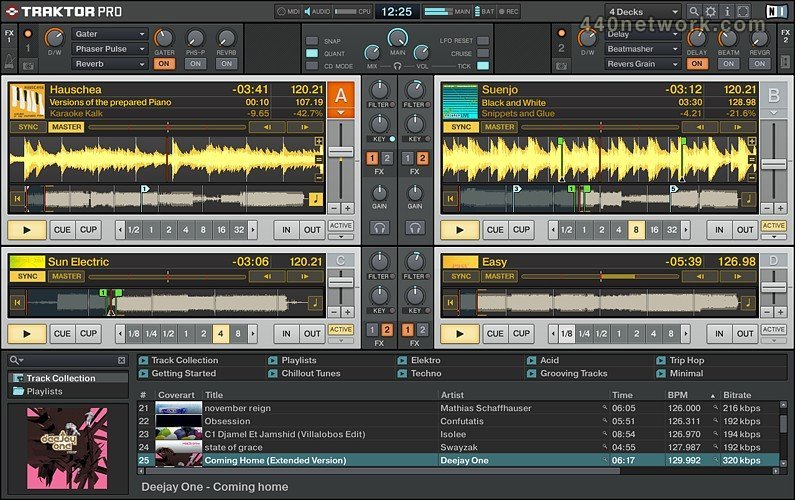
Résultat de plusieurs années de développement de logiciel pour DJ, Traktor Pro est conçu pour correspondre aux attentes des DJ professionnels. Nouveau workflow, nouveaux effets, incorporation flexible des principaux contrôleurs MIDI, qualité sonore optimale, 4 platines, Traktor Pro redéfinit l'art du DJing.
Caractéristiques :
- jusqu'à 4 platines avec détection de beat ultra-précise, et nouvelle fonction Sync Lock. Des fonctions intelligentes de loop et cue permettent aisément de déconstruire et remixer les morceaux à la volées, tandis que le détecteur de tempo master permet de jouer avec 4 platines et des effets sans perdre la synchronisation.
- EQ et filtres Allen & Heath, 21 effets chaînables.
- nouvelle interface simple et fonctionnelle entièrement personnalisable
- navigateur amélioré avec de nouvelles fonction comme la navigation parmi les pochettes de disques, ou l'export des metadonnées
- workflow des standards de l'industrie intégrés à Traktor Pro, que ce soit depuis les touches du clavier, la souris, un contrôleur MIDI.
- setup complètement flexible, compatible avec tous contrôleurs ou platines externes
 |
Version 2.1.2 |
MacOS X Intel |
(App) |
12 déc 2011 |
MIDI Clock send/receive stability improved
Cueing issues with CD Timecode fixed
Track start position offset with timecode media fixed
CUP instant mode with "Quant" enabled fixed
CUP instant mode for decks B/C/D fixed
Built-in soundcard fall-back fixed
MIDI controls "Tempo Sync", "Load Loop Play", "Load From List" and "Track End
Warning" fixed
Drag & Drop from preview player to deck fixed
TAP when working with beatgrids fixed
Reset deck controls for pitch fader fixed
Issues when loading a missing sample to a sample slot fixed
Issues with ASIO control panel for some 3rd party devices fixed
Crash when removing Traktor Kontrol X1 fixed
 |
Version 2.0.1 |
MacOS X Intel |
(App) |
30 mar 2011 |
- Optimized used interface + TruWave:
* TruWave waveforms offer a whole new dimension to your mix - differentiate between kicks, hi-hats and snares and anticipate your mix
* Thanks to various zoom levels, set up tighter cue points than ever before
* The overview of the whole track ("stripe") clearly displays the track's arrangement with full detail
* New layouts, including Essential View for maximum ease-of-use when using TRAKTOR with external mixer and controller(s)
- Sample Decks
* Grab and layer your own loops or use the included loop content. Create one-shot samples or use the included DJ Craze scratch sounds
* Grab loops live out of a running deck, store your favorites in the loop library, and develop your own arsenal of beats and sounds
* Layer up loops in perfect sync with the decks
* PRO versions only: Tweak the volume and filter for each Sample Deck slot separately
* PRO versions only: 2 different sizes for the Sample Decks; each of the 4 decks can be switched from track deck to Sample Deck and vice versa, on the fly
- New effects
* Tape Delay, Ramp Delay, Bouncer and Auto Bouncer join the arsenal of professional DJ effects, taking the potential for sound mangling to the extreme
* With a multi-channel audio interface such as the TRAKTOR AUDIO 10 you can now use TRAKTOR effects as an independent send / receive effects unit
- Included loop content
* 40 original loops and 10 full tracks drawn from Loopmasters' new DJ Mixtools series, plus additional scratch sounds by DMC Champ DJ Craze
* Drum, bass, percussion and synth loop in dubstep, minimal, house, techno and trance styles
* Grab loops from any playing track in seconds, and save them in the loop library
- Loop recorder
* Trigger the recording using a foot pedal, a DJ controller such as TRAKTOR KONTROL X1 or a keyboard hot key
* Overdub on top of the running loop in real time, creating additional layers and heightening dramatic FX buildups and peaks
* Works like a 5th deck. You can transfer the layered loop into a Sample Deck slot instantly, freeing up the Loop Recorder for further use
 |
Version 1.2.7 |
MacOS X Intel |
(App) |
12 nov 2010 |
New functionality:
* Resolution for "tempo" parameter increased
* "Snap/Vinyl" mouse mode enabled for Traktor Duo / Traktor Scratch Duo
Fixes:
* Caching and waveform display issues with AAC files fixed
* Startup crash on system sample rate mismatch fixed
 |
Version 1.2.6 |
MacOS X Intel |
(App) |
30 avr 2010 |
* Crash when pressing delete button of empty track fixed
* Random crashes while editing playlists fixed
 |
Version 1.2 |
MacOS X UB |
(App) |
14 sep 2009 |
- NEW EFFECTS FOR PRO
Users of TRAKTOR PRO and TRAKTOR SCRATCH PRO are treated to three extra effects in this 1.2 version. Taking the total to 24 highly creative and professional effects, this update adds a Beat Slicer, and Formant Filter and a Peak Filter to your arsenal of weapons- all of which need to be heard to be believed.
- Four independent effect units:
The already impressive TRAKTOR effects section just got twice as nice. With the addition of two more effects units (in PRO versions only) the potential for warping and twisting your tracks has been vastly increased. With three separate effects chainable per unit, the possibilities are now almost endless.
- Native HID / Display Support
TRAKTOR now supports the HID (Human Interface Device) protocol for the Pioneer CDJ-400 and display support for the Denon DN-HC4500. HID is an alternative to MIDI control that boasts a much improved sensitivity, meaning even more precise control over pitch control and effects parameters etc. HID also utilizes the product displays to show TRAKTOR info such as track name, remaining time etc, directly on the hardware.
- IMPROVED TIME-STRETCHING ALGORITHM
The new advanced Élastique time stretching algorithm delivers a new level in time-stretching quality at an amazing workload efficiency. The algorithm has been developed to detect tonal and transient components in your tracks with high accuracy, making the Keylock function in TRAKTOR 1.2 sound pristine. The new algorithm also ensures exceptional efficiency in CPU usage.
- Other enhancements
* Drag & Drop from decks to playlist
* Two additional "favorite playlist" slots
* New "Progressive Sensitivity" option for Pitch Bend
* Customizable Cue Play button behaviour (Instant/On Release)
* Additional "Preparation List" features with diamond icons, "Append/add next" menu functions
* Adjustable "minimum playtime filter" for play count and history functions timecode
* Internal EQs enabled for external mixer mode
* New track caching technology with reduced memory footprint
* Improved Tap Tempo function
* Direct tag editing in Explorer node
* Pitch Bend controller assignable to jog wheels
* One-Click setting of hotcues
 |
Version 1.1 |
MacOS X UB |
(App) |
25 mai 2009 |
Version 1.1 :
- MASCHINE INTEGRATION
TRAKTOR will work in perfect harmony with the upcoming MASCHINEgroove studio. Sync MASCHINE to TRAKTOR and use the AUDIO 8 DJ to route the MASCHINE audio to your mixer. Simultaneously use the MASCHINE hardware as a MIDI controller for TRAKTOR.
- Auto Sync Mode
Once you have selected SYNC for a deck, it will remain engaged when loading a new track. Drop a new track into a mix in perfect time, without having to hit the sync button again.
- Advanced Controller Setup Wizard
Fast and convenient set up of controllers and interfaces is now possible with the addition of this feature. The Wizard can be dialed up from within the application (and opens on first startup) plus it also allows hotplugging of devices while TRAKTOR is running. Once a device is connected, select it in the Wizard and it'll load the respective TSI with all settings. Plug and play!
- High-Resolution 14 Bit MIDI support
Added support for 14bit-MIDI in version 1.1 allows TRAKTOR PRO to leverage the extended precision and responsiveness of high-resolution knobs and faders on various current DJ controller models.
- Adjustable pitch bend sensitivity
With version 1.1, you can now control the sensitivity of the pitch bend function via the preferences pane
- Modifiers for keyboard mappings
Create more complex and intelligent keyboard mappings with this update
- New 10% tempo slider range
The tempo slider range now matches the range of various CD decks (CDJ etc)
- New "Manual" clock mode for manual assignment of master and slave
- Improved master clock tracking of deck tempo (8x increase)
- New "History Archive" browser node
- Option to physically delete tracks in browser
- Option to remove TRAKTOR-specific tags from collection