 WaveLab v 8.0.2
5 juil. 2013
Windows
WaveLab v 8.0.2
5 juil. 2013
Windows
WaveLab v 8.0.1
13 mai 2013
Windows
Version 8.0.1 resolves several issues in the areas of user interface, rendering, Workspaces and plug-ins.
WaveLab v 8.0
6 mai 2013
Windows
WaveLab 8 features a brand-new speaker management system, loudness metering and processing, single-window plug-in management, a master control panel, iZotope’s MBIT+ master dither, Voxengo’s CurveEQ, brickwall limiter and tube compressor, SuperClips, metadata support and over 150 improvements to its user interface and comprehensive tool set.
WaveLab v 7.2.1
23 déc. 2011
Windows
7.2.1 update addresses some crash bugs and other issues.
WaveLab v 7.2
12 déc. 2011
Windows
Connect to the core of WaveLab
WaveLab 7.2 is the latest free update to Steinberg's award-winning solution for mastering, audio editing and restoration. The new version includes 64-bit versions for Mac and Windows platforms and adds full remote control support for Steinberg's CI, CMC or CC121 control devices or any other MIDI-compatible hardware. Other highlights include an Export-to-SoundCloud function, an updated version of the Dirac algorithm and several workflow and user interface improvements.
Remote control support
WaveLab 7.2 comes with a comprehensive remote control support, perfectly integrated with your CI, CMC series and CC121 controller hardware. Adjust plug-in parameters, volume levels or the stereo pan — faster and more convenient than before. Best of all, WaveLab 7.2 also supports the AI knob technology, allowing you to seamlessly control all program parameters with one central knob directly from your Steinberg hardware.
Of course, WaveLab 7.2 is also ready to be used with up to three other MIDI-based control surfaces supporting the MIDI learn function, which lets you easily assign the controls of your hardware to a specific parameter within the application.
WaveLab 64-bit experience
WaveLab 7.2 and WaveLab Elements 7.2 are now available as 64-bit versions for Mac OS X Lion and Windows 7 platforms. Edit hundreds of tracks simultaneously, handle extensive batch processes or analyze and restore audio material with utmost precision — with the advent of 64-bit support, your WaveLab experience will be faster than ever. And all the included VST 3 plug-ins, such as the advanced Sonnox restoration suite, are already available as 64-bit versions.
SoundCloud support
Share your recordings with people around the world — SoundCloud is the perfect place to let others hear what you have recorded, mixed and mastered. With WaveLab 7.2, uploading a track to your SoundCloud account can be done within just a few clicks. Simply choose "Upload to SoundCloud" in WaveLab's File menu or the option in the WaveLab 7 render dialog and you are done.
Time-stretching and pitch-shifting for professionals
The latest version of the award-winning Dirac time-stretching algorithm now includes several improvements and provides an even better quality. Dirac 3.5 works wonders on polyphonic audio material and stands in a class of its own.
Your session, your layout
WaveLab 7.2 comes with a new start up dialog where you can easily choose a window layout that is opened when WaveLab starts. You can define your own, personalized layouts or pick one of the factory presets — it takes just a few moments to set up your session.**
Speed up your production process
WaveLab 7.2 features an enhanced DDP file workflow. Once you have created a new DDP file, WaveLab 7.2 automatically offers a button that let's you import the DDP file directly into the Audio Montage area for further adjustments.
After importing DDP files, WaveLab 7.2 now labels clips and markers with more appropriate names, allowing you to easily identify the imported files. Last but not least, WaveLab 7.2 brings enhanced file quality by offering an option to verify the DDP file checksum.**
Enhanced marker handling
Creating and editing markers has always been an important part of the WaveLab workflow. In WaveLab 7.2 this workflow has been streamlined as this new version introduces a floating marker window, allowing you to easily create, name — simply manage — all markers and regions in your project.
Workflow improvements
Now you can change fader values using the computer mouse wheel. Plus, pressing Shift allows for fine adjustments, whereas pressing Alt allows for coarse adjustments.
Save Copy option
Handling several projects and revisions of opened sessions can often be confusing. WaveLab's Save As function now includes a Save Copy option. No matter if you want to save an audio file or the entire Audio Montage — when this option is activated, a copy of the opened document is saved and the document continues to refer to the source file.
CD-related enhancements
The CD Wizard now includes options to name and rename markers and the CD Report dialog contains a text-based report generator. Plus, the total CD time is now being displayed within the CD tool-window.
Windows scripting
In addition to the internal WaveLab scripting possibilities, Windows scripting allows you to control WaveLab from an external application (not to be mixed up with internal WaveLab scripting).
WaveLab v 7.1.1
1 juil. 2011
Windows
The 7.1.1 version solves issues, which have been reported by our valued customers. For details, please see the
version history
WaveLab v 7.1.0
21 avril 2011
Windows
WaveLab v 7.0.1
7 déc. 2010
Windows
The new update includes a wealth of enhancements and addresses issues that have been reported by our valued customers.
The new update will further improve the stability and usability of WaveLab 7 in areas such as plug-ins, file handling, transport, Audio Montage, burning engine, Batch Processing, key commands, time-stretching and the graphical user interface.
WaveLab v 7.0
8 oct. 2010
Windows
(07/10/2010) version démo disponible
Steinberg ouvre ce jour un nouveau chapitre de l'histoire de WaveLab, qui a débuté il y 15 ans. Pour la toute première fois, la solution d'édition et mastering audio renommée dans toute l'industrie devient disponible pour les stations Mac et PC (Windows).
Reposant sur un code paré pour l'avenir, WaveLab 7 combine une pléthore de nouvelles fonctions et fonctionnalités avec une façon de travailler totalement unique. De nombreuses technologies avancées ont été implémentées, comprenant notamment le support VST3, les algorithmes de time-stretch avancés, un moteur de gravure haut de gamme plus le support du DDP. L'interface utilisateur de WaveLab a été complètement repensée, et propose à présent une puissante gestion des espaces de travail, des barres à outils personnalisables et un système d'aide embarqué. En plus de ces nouveautés qui vous feront gagner beaucoup de temps, WaveLab 7 propose une gamme d'outils complète pour le mastering et la restauration d'audio pour les professionnels, avec la suite de restauration et de suppression efficaces de bruit de chez Sonnox, plus 30 plug-ins VST3 hautement acclamé de chez Steinberg.
WaveLab v 6.1.1
18 oct. 2009
Windows
This minor update enables the installation of WaveLab 6 on Windows 7 (32-bit and 64-bit) as a 32-bit application.
This is not a patch but a full installer. You do not need your original WaveLab 6 installation CD. A valid license must be available. It can be used over an existing installation.
Compared to WaveLab 6.1 no new feature or bug fix is introduced, except for a better compatibility when loading Waves plug-ins.
This update isn't officially supported because version 6.1.1 hasn't been fully tested.
WaveLab v 6.01
18 oct. 2006
Windows
Amélioration :
optimisation des performances ainsi que de l'accès disque
Le mode "Insert until cursor" a été ajouté
fréquence d'échantillonnage étendues
Corrections :
Auto-split tool
fixe : message d'erreur à la création d'un fichier peak
fixe : encodage mp2
fixe : pitch shift
fixe : encodage des fichier WMA
fixe : erreur d'opération de montage
La fonction "Import special audio files" n'est plus limitée à 2Gb
fixe : import AES31
fixe : la fonction "When opening Wavelab, set this folder"
fixe : d'autres petits bug .
WaveLab v 6.0
2 janv. 2006
Windows
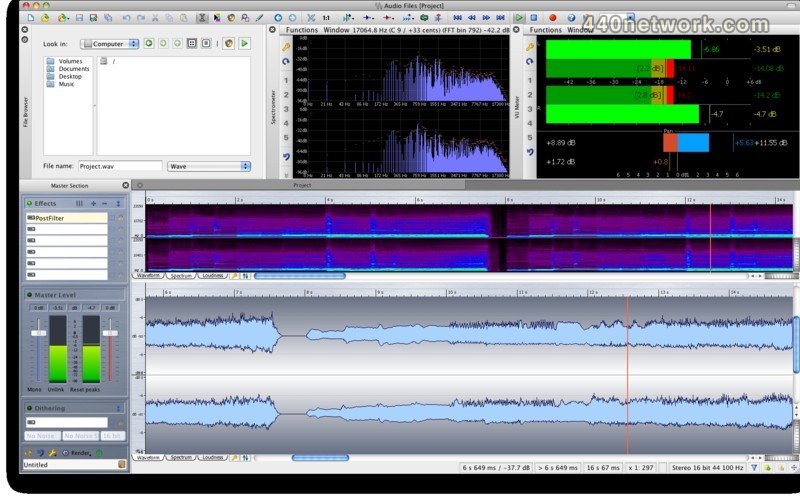
New Spectrum Editor
WaveLab 6 offers an advanced new Spectrum Editor with its sonogram view. This exciting new editing tool allows ultra-fine surgical editing of the audio file's frequency information, allowing a range of procedures such as the complete removal of unwanted noises or frequency ranges.
This exceedingly flexible editor employs highest quality linear phase filters and offers many exciting new sound replacement options including cut and paste of an audio file's background ambience to another part of the file or plug-in processing on selected frequencies.
DIRAC Time-stretching and Pitch-shifting
DIRAC is among the most advanced algorithms for time-based manipulation of audio material available today. Excellent audio quality, outstanding performance and maximum precision are among the superlative qualities this technology brings to WaveLab 6. Its flexibility allows it to be used on a huge range of audio material including vocals, drum loops and classical string ensembles to name just a few.
Master Section
The settings and plug-in chain in the Master Section can now we saved as a preset with the audio file or audio montage. This allows the simultaneous editing of several audio files or versions while retaining all the vital settings in the Master Section.
The enhanced new Master Section now also offers a useful and time-saving new function: SmartBypass. This automatically compensates the different loudness levels of original and processed audio, allowing a lightning-quick A/B comparison.
New Audio Processors
The Crystal Resampler is a top-end new sample rate converter supporting up to 384 kHz, with other new additions including time-saving new tools such as the Loudness Normalizer and the Smat Silence plug-ins.
Audio Montage
The powerful Audio Montage environment has been upgraded even further with WaveLab 6, offering new functions such as new fade editing features, batch processing and extended import and export options.
Audio File Handling
WaveLab 6 places no limit on the size of clips, and even files exceeding 2GB in size can now be imported. Other optimizations include enhanced performance when reading and writng files, automated renaming of files as a batch process and a new file list manager handling access and sorting of up to 200 hundred recent audio files.
Analysis Tools
WaveLab 6 offers a range of new metering and monitoring tools including the Loudness Distribution window and a new Waveform scope display. WaveLab now also supports the K-System metering standard developed by mastering legend Bob Katz.
Software and Hardware Integration
A further highlight is the full integration of external effect hardware within the digital mastering process. With WaveLab 6, any favorite analog hardware unit can be used within WaveLab, combining the advantages of both the digital editng and analog processing domains into one personalized, integrated mastering environment. Version 6 also supports MIDI remote controllers, allowing intuitive, immediate control over many software functions from a compatible hardware controller.
moins...

 MacOS X Intel


Vous devez vous identifier pour poster un commentaire:
Identifiez vous grace à votre compte 440Software (MacMusic, PcMusic, 440TV, 440Forums, 440Software, ...) ou via votre compte FaceBook, Twitter ou Google.