 HALion v 4.0
13 juin 2011
MacOS X Intel
HALion v 4.0
13 juin 2011
MacOS X Intel
Top-notch Virtual Analog Synthesizer
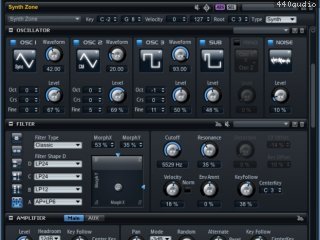
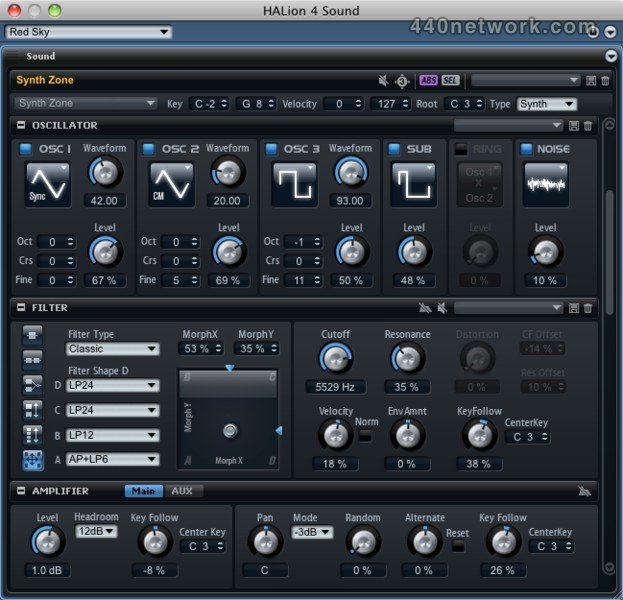
Alongside its comprehensive sampler functionality, HALion 4 now contains the high-class Virtual Analog Synthesizer already known from HALion Sonic. Create razor-sharp leads and evolving pads from scratch and switch over to meticulously layered sample programs, powerful editing tools and sublime sound controls in the sampler section — mutual benefits guaranteed.
Flexible user interface and multi-monitor support
With its flexible desktop architecture HALion can be adjusted to each phase of your creative process and lets you stay on top of things, even when working on large projects. Designed for the most demanding sound design tasks, HALion 4 lets you resize, move and dock windows, save and recall screen sets, spread windows across multiple monitors, and create tabs for frequently used functions. Simply leave out screen-cluttering elements and build a workspace that is dedicated to your current projects and individual needs.
VST 3.5 and VST Expression 2 support
HALion 4 supports the new VST 3.5 standard with all its advantages like VST Expression 2.0, Note Expression and Quick Control integration. With the groundbreaking Note Expression feature, individual note events now contain their own set of controller data when played polyphonically, therefore offering you a whole new creative approach to sound design. With VST Expression Maps, musical articulations and playing styles can be directly controlled during any performance and recording.
Sensationally easy sound programming with MegaTrig
The advanced HALion 4 version of MegaTrig contains loads of new features and conditions that let you create own playing styles, articulations and conditional triggering easier and faster without page-filling scripting. With plenty predefined conditions that can individually be combined, you can bring your sound to the next level. Turning your vision to reality has never been easier!
FlexPhraser module
Based on Yamaha's Motif Technology, the FlexPhraser arpeggiator allows complex instrument patterns. Complete MIDI multi-channel FlexPhrases can be mapped across the keyboard or the virtual drum pads and start an entire inspiring backing just with a single fingertip. Beyond dozens of different arpeggio types, FlexPhraser is the perfect tool for playing complete instrument patterns in sync to the host with a touch of a key! The possibilities are sheer endless!
Flexible signal routing
HALion 4 incorporates a state-of-the-art mixing engine with powerful routing options for complete control over your signal flow. There are virtually no restrictions — create an unlimited number of buses per Program and Layer and freely route the signals as desired. Each bus holds controls for level, pan, mute and solo as well as eight insert slots. What's more, HALion 4 features a total of 32 stereo output channels and 6-channel surround support. This way you not only handle complex setups easily, but also create professional mixes without ever leaving HALion 4.
MediaBay Integration
To keep track of your sounds and presets HALion 4 includes the comfortable MediaBay which helps you to immediate access the sounds you are looking for
 HALion v 3.5
21 mai 2009
MacOS X UB
HALion v 3.5
21 mai 2009
MacOS X UB
Improvements:
HALion 3.5 is available as a native 64-bit plug-in and should work in any VST 2.4 compatible native 64-bit sequencer, like Cubase 5 or Cubase Studio 5. The dramatically enhanced memory address space gives new possibilities for really large setups and very detailed sampled instruments.
New HALion 3 Factory 5 Content bank with 128 brand new
sounds available!
New entry available in the file menu: "Save as default Bank" allowing to save the current bank as default bank.
New "Choose External Audio Editor" option in the global context menu to choose an external audio editor (like Wavelab or Soundforge).
Improved resampling algorithm quality.
Preload time settable as global default by clicking on the apply button with Ctrl (Windows) or Cmd (OS X) pressed
Changes in the disk-streaming engine: under specific
circumstances HALion 3.5 features more reliable play back of disk streamed voices.
Important note
Due to several changes needed for 64-Bit compatibility projects created with HALion 3.5 can not be loaded with any prior version (of course you can load projects created with versions before in 3.5).
For 32-Bit and OS X users it is recommended to continue using HALion 3.3.2, except you need compatibility to the HALion 3.5 64-Bit version. For example in dual boot configurations with 32/64-Bit Vista you need to install HALion 3.5 on the 32-Bit machine as well to keep compatibility between both.
 HALion v 3.2.1
18 avril 2006
MacOS X PPC
HALion v 3.2.1
18 avril 2006
MacOS X PPC
amélioration de la vitesse de chargement des samples, programs et banks avec meilleure gestion de la mémoire
correction de bugs
HALion v 3.1
10 mars 2005
MacOS X PPC
HALion v 3.0.1.538
5 oct. 2004
MacOS X PPC
changements numériques plus pratiques avec la molette de souris pour l'édition de texte
nombreux bugs corrigés.
HALion v 3.0.1.512
23 août 2004
MacOS X PPC
HSB content : ajout de commande "Remove from HALion Content"
catégorie caching de fichiers fxp
bugs corrigés
HALion v 3.0.1.489
30 juin 2004
MacOS X PPC
ajout de 2 nouvelles catégories utilisateurs "favorites" (total de 5 maintenant)
Les catégories utilisateurs "Favourites 1-5" peuvent être renommées (ctrl + sélection)
ajout de "Save Bank…" dans le menu global Archive
nombreux bugs corrigés
HALion v 3.0
23 mai 2004
MacOS X PPC
nouveau navigateur de fichiers avec support du glisser-déposer, catégories de son et indexation
nouvelle section Insert et Send Effects. Les départs d'effets peuvent être envoyés vers les 27 effets internes de Halion, ou directement vers le mixeur VST pour partager les plug-ins entre l'application hôte et Halion
fonction RAMsave, pour une meilleure gestion de la RAM
mode Alternate
encore plus de formats supportés
nouvelle interface
moins...


 Windows


Vous devez vous identifier pour poster un commentaire:
Identifiez vous grace à votre compte 440Software (MacMusic, PcMusic, 440TV, 440Forums, 440Software, ...) ou via votre compte FaceBook, Twitter ou Google.