Les Logiciels de MacMusic ont changé d'adresse
L'annuaire de logiciel de MacMusic a maintenant son propre site. Dorénavant, merci de visiter 440Software et de mettre à jour vos signets.
Retrouvez Logic Express sur 440Software.com
Cliquez ici
Logic Express
|
|
||||||||||||||||||||||||||
|
Télécharger la MAJ
|
Séquenceur Audio MIDI
Créez votre propre musique grâce à un ensemble complet de fonctionnalités et d'outils pour la production musicale assistée par ordinateur. Logic Express permet aux musiciens, producteurs et compositeurs en herbe de passer à un niveau supérieur à GarageBand sans casser leur tirelire. Avec la même présentation et structure flexible que celles de Logic Pro, vous pouvez aller plus loin dans la création et la manipulation de contenus audio et MIDI.
| Version 9.1.6 | MacOS X Intel | (App) | 15 déc 2011 |
Compatibility
On OS X 10.7 Lion, Revert to Saved is now possible after a project has been renamed.
Performance and Stability
Logic now uses multiple available cores as expected when performing offline bounces.
Resolves an issue in which Logic sometimes quit unexpectedly when deleting multiple Marquee selected tracks with the Drag Mode set to Shuffle L.
Fixes an issue in which clicking in an automation lane with the Marquee tool could cause Logic to quit unexpectedly.
Channel strip level meters no longer sometimes momentarily stop responding when the playhead is moved to a new position during playback.
Loading a Kontakt 4/5 factory preset in 64-bit mode no longer causes Logic to quit unexpectedly.
Logic now reliably initializes MIDI ports when Logic is launched by double-clicking a project file, choosing "Open with" from the project file contextual menu, or when using the Load Most Recent Project startup action.
Audio
Channel strips with pre-fader sends now mute consistently.
Audio playback while using Prelisten in the Audio Bin now properly updates when changing the selection of files or regions.
Fixes an issue in which record repeat would delete the wrong take.
Plug-ins and Instruments
Dropping multiple samples on the EXS editor keyboard and choosing the Contiguous Zones option now correctly results in a chromatic mapping of the samples.
Using the + key to step through EXS instruments no longer causes Logic to sometimes quit unexpectedly.
The Key Release Time for a Group can now be set to values greater than 1,000 as expected in the EXS editor.
Fixes an issue in which EXS24 did not play one-shots in mono or legato mode.
Resolves an issue in EXS24 in which instruments containing zones triggered by key release via a group were susceptible to stuck notes.
In EVB3, the extended parameter area no longer shows controls already available in the main plug-in window.
Ultrabeat now properly maintains the set pitch of a previously loaded sample after browsing for a new sample and then canceling.
Resolves an issue in which auditioning samples in Ultrabeat with Voice Auto Select and "Preview in Voice" active could lead to a sample endlessly looping.
Control Surfaces
Changes made to a project using a control surface now reliably activate the control surface Save button.
The Undo LED on Logic Control now correctly lights to show the availability of undo steps.
Setting parameter assignments on Control Surfaces to fixed values other than 1 now works correctly in 64-bit mode.
General
Clicking on an unused take after deleting a comp section no longer selects the entire take folder.
Resolves an issue in which using Auto Set Locators by Marquee Selection with very small Marquee selection lengths could result in the playhead getting stuck.
Playback now reliably starts from the beginning of the project after using the "Return to Zero" button in the Transport window, no matter what Play setting is active.
With Catch Clock Position active and Cycle enabled, Logic now centers the cycle area if it fits within the current view.
Fixes an issue in which the visible area in the Arrange window would sometimes jump a few pixels to the left after scrolling to the right on OS X 10.7 Lion.
Resolves an issue in which using the Fade tool on a region could cause audio regions to be deleted in projects that contain unused audio regions.
"Bounce - Replace All Tracks" now places regions on the correct tracks in songs that contain MIDI take folders.
Volume automation now works reliably on all frozen tracks.
Resolves an issue in which the Hyper editor did not reliably update to show new selections at high vertical zoom levels.
MIDI editors now reliably update to show the contents of MIDI regions selected by rubber-band selection.
In the Event editor, the up, down, left, and right arrow keys now correctly navigate between fields while in text edit mode.
Logic no longer sometimes asks to save changes when closing a song that has not been changed.
The key commands to select projects now work as expected.
After using Save As to make a new version of an existing project to a new location, the recording path for the project is now appropriately updated to the location where the new project was saved.
Resolves an issue in which moving an audio region where the anchor had been set caused the anchor to reset to the beginning of the region if the project contained take folders.
Fixes an issue in which moving or copying a take folder with the drag mode set to No Overlap could alter the take folder.
All instrument and effect plug-ins that use LFO's synced to the beat now behave correctly.
The Toggle Zoom key command now returns to previous zoom level as expected.
Improved compatibility with Apogee's Duet 2.
On OS X 10.7 Lion, Revert to Saved is now possible after a project has been renamed.
Performance and Stability
Logic now uses multiple available cores as expected when performing offline bounces.
Resolves an issue in which Logic sometimes quit unexpectedly when deleting multiple Marquee selected tracks with the Drag Mode set to Shuffle L.
Fixes an issue in which clicking in an automation lane with the Marquee tool could cause Logic to quit unexpectedly.
Channel strip level meters no longer sometimes momentarily stop responding when the playhead is moved to a new position during playback.
Loading a Kontakt 4/5 factory preset in 64-bit mode no longer causes Logic to quit unexpectedly.
Logic now reliably initializes MIDI ports when Logic is launched by double-clicking a project file, choosing "Open with" from the project file contextual menu, or when using the Load Most Recent Project startup action.
Audio
Channel strips with pre-fader sends now mute consistently.
Audio playback while using Prelisten in the Audio Bin now properly updates when changing the selection of files or regions.
Fixes an issue in which record repeat would delete the wrong take.
Plug-ins and Instruments
Dropping multiple samples on the EXS editor keyboard and choosing the Contiguous Zones option now correctly results in a chromatic mapping of the samples.
Using the + key to step through EXS instruments no longer causes Logic to sometimes quit unexpectedly.
The Key Release Time for a Group can now be set to values greater than 1,000 as expected in the EXS editor.
Fixes an issue in which EXS24 did not play one-shots in mono or legato mode.
Resolves an issue in EXS24 in which instruments containing zones triggered by key release via a group were susceptible to stuck notes.
In EVB3, the extended parameter area no longer shows controls already available in the main plug-in window.
Ultrabeat now properly maintains the set pitch of a previously loaded sample after browsing for a new sample and then canceling.
Resolves an issue in which auditioning samples in Ultrabeat with Voice Auto Select and "Preview in Voice" active could lead to a sample endlessly looping.
Control Surfaces
Changes made to a project using a control surface now reliably activate the control surface Save button.
The Undo LED on Logic Control now correctly lights to show the availability of undo steps.
Setting parameter assignments on Control Surfaces to fixed values other than 1 now works correctly in 64-bit mode.
General
Clicking on an unused take after deleting a comp section no longer selects the entire take folder.
Resolves an issue in which using Auto Set Locators by Marquee Selection with very small Marquee selection lengths could result in the playhead getting stuck.
Playback now reliably starts from the beginning of the project after using the "Return to Zero" button in the Transport window, no matter what Play setting is active.
With Catch Clock Position active and Cycle enabled, Logic now centers the cycle area if it fits within the current view.
Fixes an issue in which the visible area in the Arrange window would sometimes jump a few pixels to the left after scrolling to the right on OS X 10.7 Lion.
Resolves an issue in which using the Fade tool on a region could cause audio regions to be deleted in projects that contain unused audio regions.
"Bounce - Replace All Tracks" now places regions on the correct tracks in songs that contain MIDI take folders.
Volume automation now works reliably on all frozen tracks.
Resolves an issue in which the Hyper editor did not reliably update to show new selections at high vertical zoom levels.
MIDI editors now reliably update to show the contents of MIDI regions selected by rubber-band selection.
In the Event editor, the up, down, left, and right arrow keys now correctly navigate between fields while in text edit mode.
Logic no longer sometimes asks to save changes when closing a song that has not been changed.
The key commands to select projects now work as expected.
After using Save As to make a new version of an existing project to a new location, the recording path for the project is now appropriately updated to the location where the new project was saved.
Resolves an issue in which moving an audio region where the anchor had been set caused the anchor to reset to the beginning of the region if the project contained take folders.
Fixes an issue in which moving or copying a take folder with the drag mode set to No Overlap could alter the take folder.
All instrument and effect plug-ins that use LFO's synced to the beat now behave correctly.
The Toggle Zoom key command now returns to previous zoom level as expected.
Improved compatibility with Apogee's Duet 2.
| Version 9.1.5 | MacOS X Intel | (App) | 9 aoû 2011 |
This update improves overall stability and addresses some minor issues including the following:
All instrument and effect plug-ins that use LFO's synced to the beat now behave correctly.
The Toggle Zoom key command now returns to previous zoom level as expected.
Improved compatibility with Apogee's Duet 2.
All instrument and effect plug-ins that use LFO's synced to the beat now behave correctly.
The Toggle Zoom key command now returns to previous zoom level as expected.
Improved compatibility with Apogee's Duet 2.
| Version 9.1.4 | MacOS X Intel | (App) | 25 mai 2011 |
This update improves overall stability and addresses a number of minor issues, including the following:
* Support for opening projects imported from GarageBand for iPad.
| Version 9.1.3 | MacOS X Intel | (App) | 29 oct 2010 |
Improved compatibility with Hyper-Threading.
| Version 9.1.2 | MacOS X Intel | (App) | 15 oct 2010 |
Some issues addressed in this update include but are not limited to:
Performance and Stability
* Logic's performance while playing movies at larger than 300% native size in 64-bit mode has been improved.
* Resolves an issue that could cause the warning dialog "Memory Getting Low" to appear when simultaneously recording multiple tracks in 32-bit mode.
* Resolves an issue that could cause the warning dialog "Specified volume doesn't exist -35" to appear when simultaneously recording multiple tracks in 32-bit mode.
* Using the Undo command after a "Bounce in Place" command now correctly reinserts used plug-ins on the channel strip.
* Performing Undo after using the "Bounce - Replace All Tracks" command now correctly restores all automation.
* Resolves an issue that sometimes caused Logic to stop responding when loading a setting for a mono plug-in in a multi-mono surround configuration.
Compatibility
* Improves compatibility with 6- and 12-core Mac Pro systems.
* Supports iOS control surface apps that utilize the OSC protocol.
* Supports REX files when running in 64-bit mode.
* Improves compatibility with select Audio Unit plug-ins.
* The expanded System Performance window now accurately reflects the number of available real cores on all supported computers.
* Logic no longer inadvertently reloads the content for third-party sampler plug-ins such as Native Instrument's Kontakt after tracks are deleted, or after some other edits are performed.
* Resolves an issue introduced in Logic 9.1.1 that could cause the spacebar to incorrectly trigger playback in Logic while the Melodyne plug-in window had focus.
* Logic Control or Mackie Control hardware control surfaces no longer switch to plug-in edit view when a plug-in on slots 8-15 is removed.
MIDI Editing
* Resolves an issue introduced in Logic 9.1 where using the Marquee tool to trim the end of a MIDI region could extend the number of loops for regions earlier in the same track.
* The Piano Roll now updates as expected to show the currently selected MIDI take.
* Resolves an issue in Logic 9.1.1 which could cause the Score to not display all notes from a region that had been split with the Scissors tool.
* The appearance of downward slurs and ties has been improved in the Score window.
* When pasting MIDI events into the Arrange area, the playhead no longer jumps unexpectedly to a position far to the right of the end of the pasted content.
Instruments and Effects
* Amp Designer now reliably maintains saved non-default EQ settings when a project is reloaded.
* The Wah Wah stompbox now responds more reliably to expression pedal input.
* EXS24 loads and plays back instruments that use short AAC or ALAC audio files when Virtual Memory is disabled.
* Corrects an issue that could cause the "Next Plug-in Setting or EXS Instrument" key command to change settings on the wrong plug-in.
* It is possible again to copy and paste sequences between Voices within an Ultrabeat pattern.
* A Software Instrument with a Send set to Post Pan no longer loses audio output when the Aux it sends to is soloed, and the Software Instrument's pan is adjusted.
* Software Instrument tracks with the AUNetReceive plug-in no longer exhibit excessive latency.
* The Noise Gate no longer creates audible clicks while processing audio with the plug-in GUI open.
* Double-clicking an insert slot will close the associated plug-in if it is open and set to Link Mode.
* In the EXS Editor, a mouse roll over of an audio file name now displays the full path for the file.
* The EXS Editor now properly displays all Groups even those that have the same name.
File Handling and Management
* Resolves an issue which sometimes caused the text after a period in a plug-in setting name to be lost on the first save of the setting.
* Resolves an issue from Logic 9.1.1 which forced exported MIDI files to have a .logic extension rather than the .mid extension.
* Import of folder tracks from other projects now works reliably.
* Bank and Patch names in Multi-instruments now import correctly when using the Track Import feature.
* Resolves an issue which could cause the Track Import window to become non-functional in certain rare cases.
* Import of stereo Input Channel Strips from other projects now works reliably.
* It is again possible to drag split stereo audio files from the Finder into the Arrange window.
* The mute status is now maintained for tracks imported from other projects using Selective Track Import.
* The "Export Region as Audio File" and "Export Track as Audio file" functions now add tempo information to the exported files.
* The EXS24 now automatically locates samples stored in a folder inside the Project Folder that have any of the following names: "Samples," "Sampler Files," "Sampler Instruments," or "Audio Files."
* When a project is opened from a project folder that has been copied, EXS24 now loads samples from the copied location instead of the original.
* It is now possible to drag and drop an AIFF audio file copied from a CD into the Audio Bin in the Media area of the Arrange window.
* The project name is no longer truncated if a period is added to the project name when performing a Save As for the project.
General Issues
* Resolves an issue where applying a crossfade with the crossfade tool might affect existing crossfades on the same track.
* A marker is no longer created unexpectedly when the Open Marker Text command is used.
* The relative movement of the mouse when editing multiple automation nodes has been improved.
* The mouse pointer no longer incorrectly shows the Freeze pointer when editing volume, pan, send, mute or solo automation on frozen tracks.
* Help tags for the Marquee Strip now show the correct range.
* Soloing an Auxiliary channel strip whose source is a Bus from another Auxiliary channel strip now works as expected.
* Copying a MIDI region on a ReWire track no longer creates an unexpected new track.
* Cutting a region at a point earlier than the anchor at high zoom levels no longer causes the region to move unexpectedly.
* Plug-ins now open with Link mode enabled when they are invoked by entering Plug-in edit mode on a remote control surface.
* When a channel strip is muted, pre-fader sends on the channel strip are now muted as expected.
* Reordering multiple Control Surface objects in the Control Surface Setup window now behaves more reliably.
* Performing comp edits while recording will no longer create graphic artifacts in the Take Folder.
* The behavior of the key commands to adjust Marquee selection borders based on transients has been improved. See this article for details.
* There is no longer audible stepping with automated volume changes at low fader levels.
* Touch automation mode now works correctly with Sculpture's Object Position 2 parameter.
* Quantize parameters are now correctly maintained when a region is divided.
* The vertical position guide when moving/copying a flexed region is now correctly positioned at the left edge of the region in projects that start earlier than position 1 1 1 1.
* The Optimize file(s) command now properly affects both channels of a split stereo file.
* Delete now works properly on selected regions within undisclosed groups in the Audio Bin.
* Resolves an issue introduced in Logic 9.1.1 that could cause channel strips with default names to display incorrectly on EuCon control surfaces.
* The "Reset All I/O Labels" command once again works as expected.
* Regions dragged from the Audio Bin to tracks within folders in the Arrange window are now correctly positioned.
* Contextual menus now appear as expected when Control- or right-clicking entries in the Audio Bin in the Media area of the Arrange window.
* Performing Undo after adding tempo events to a project no longer inadvertently modifies the selections for the active comp in a take folder.
* Regions with a negative value set for Delay in the Region Inspector are now rendered properly with Bounce Region in Place.
* Bounce Regions in Place now works properly on record-enabled audio tracks.
* The current scroll position in the Audio Bin will not jump unexpectedly after renaming an audio file.
* The color and icon assigned to a track are now properly maintained when tracks are imported using Selective Track Import.
* Using the Backspace to remove all characters in the File Browser's search field no longer causes it to lose key focus.
* Imported linked stereo files will now load with all other audio files in a Project without sometimes displaying a dialog that states "Unequal Stereo Regions Corrected."
* The MIDI channel number is now appended to the channel strip name when new tracks are created using the "New Track with Next MIDI Channel" menu option.
Performance and Stability
* Logic's performance while playing movies at larger than 300% native size in 64-bit mode has been improved.
* Resolves an issue that could cause the warning dialog "Memory Getting Low" to appear when simultaneously recording multiple tracks in 32-bit mode.
* Resolves an issue that could cause the warning dialog "Specified volume doesn't exist -35" to appear when simultaneously recording multiple tracks in 32-bit mode.
* Using the Undo command after a "Bounce in Place" command now correctly reinserts used plug-ins on the channel strip.
* Performing Undo after using the "Bounce - Replace All Tracks" command now correctly restores all automation.
* Resolves an issue that sometimes caused Logic to stop responding when loading a setting for a mono plug-in in a multi-mono surround configuration.
Compatibility
* Improves compatibility with 6- and 12-core Mac Pro systems.
* Supports iOS control surface apps that utilize the OSC protocol.
* Supports REX files when running in 64-bit mode.
* Improves compatibility with select Audio Unit plug-ins.
* The expanded System Performance window now accurately reflects the number of available real cores on all supported computers.
* Logic no longer inadvertently reloads the content for third-party sampler plug-ins such as Native Instrument's Kontakt after tracks are deleted, or after some other edits are performed.
* Resolves an issue introduced in Logic 9.1.1 that could cause the spacebar to incorrectly trigger playback in Logic while the Melodyne plug-in window had focus.
* Logic Control or Mackie Control hardware control surfaces no longer switch to plug-in edit view when a plug-in on slots 8-15 is removed.
MIDI Editing
* Resolves an issue introduced in Logic 9.1 where using the Marquee tool to trim the end of a MIDI region could extend the number of loops for regions earlier in the same track.
* The Piano Roll now updates as expected to show the currently selected MIDI take.
* Resolves an issue in Logic 9.1.1 which could cause the Score to not display all notes from a region that had been split with the Scissors tool.
* The appearance of downward slurs and ties has been improved in the Score window.
* When pasting MIDI events into the Arrange area, the playhead no longer jumps unexpectedly to a position far to the right of the end of the pasted content.
Instruments and Effects
* Amp Designer now reliably maintains saved non-default EQ settings when a project is reloaded.
* The Wah Wah stompbox now responds more reliably to expression pedal input.
* EXS24 loads and plays back instruments that use short AAC or ALAC audio files when Virtual Memory is disabled.
* Corrects an issue that could cause the "Next Plug-in Setting or EXS Instrument" key command to change settings on the wrong plug-in.
* It is possible again to copy and paste sequences between Voices within an Ultrabeat pattern.
* A Software Instrument with a Send set to Post Pan no longer loses audio output when the Aux it sends to is soloed, and the Software Instrument's pan is adjusted.
* Software Instrument tracks with the AUNetReceive plug-in no longer exhibit excessive latency.
* The Noise Gate no longer creates audible clicks while processing audio with the plug-in GUI open.
* Double-clicking an insert slot will close the associated plug-in if it is open and set to Link Mode.
* In the EXS Editor, a mouse roll over of an audio file name now displays the full path for the file.
* The EXS Editor now properly displays all Groups even those that have the same name.
File Handling and Management
* Resolves an issue which sometimes caused the text after a period in a plug-in setting name to be lost on the first save of the setting.
* Resolves an issue from Logic 9.1.1 which forced exported MIDI files to have a .logic extension rather than the .mid extension.
* Import of folder tracks from other projects now works reliably.
* Bank and Patch names in Multi-instruments now import correctly when using the Track Import feature.
* Resolves an issue which could cause the Track Import window to become non-functional in certain rare cases.
* Import of stereo Input Channel Strips from other projects now works reliably.
* It is again possible to drag split stereo audio files from the Finder into the Arrange window.
* The mute status is now maintained for tracks imported from other projects using Selective Track Import.
* The "Export Region as Audio File" and "Export Track as Audio file" functions now add tempo information to the exported files.
* The EXS24 now automatically locates samples stored in a folder inside the Project Folder that have any of the following names: "Samples," "Sampler Files," "Sampler Instruments," or "Audio Files."
* When a project is opened from a project folder that has been copied, EXS24 now loads samples from the copied location instead of the original.
* It is now possible to drag and drop an AIFF audio file copied from a CD into the Audio Bin in the Media area of the Arrange window.
* The project name is no longer truncated if a period is added to the project name when performing a Save As for the project.
General Issues
* Resolves an issue where applying a crossfade with the crossfade tool might affect existing crossfades on the same track.
* A marker is no longer created unexpectedly when the Open Marker Text command is used.
* The relative movement of the mouse when editing multiple automation nodes has been improved.
* The mouse pointer no longer incorrectly shows the Freeze pointer when editing volume, pan, send, mute or solo automation on frozen tracks.
* Help tags for the Marquee Strip now show the correct range.
* Soloing an Auxiliary channel strip whose source is a Bus from another Auxiliary channel strip now works as expected.
* Copying a MIDI region on a ReWire track no longer creates an unexpected new track.
* Cutting a region at a point earlier than the anchor at high zoom levels no longer causes the region to move unexpectedly.
* Plug-ins now open with Link mode enabled when they are invoked by entering Plug-in edit mode on a remote control surface.
* When a channel strip is muted, pre-fader sends on the channel strip are now muted as expected.
* Reordering multiple Control Surface objects in the Control Surface Setup window now behaves more reliably.
* Performing comp edits while recording will no longer create graphic artifacts in the Take Folder.
* The behavior of the key commands to adjust Marquee selection borders based on transients has been improved. See this article for details.
* There is no longer audible stepping with automated volume changes at low fader levels.
* Touch automation mode now works correctly with Sculpture's Object Position 2 parameter.
* Quantize parameters are now correctly maintained when a region is divided.
* The vertical position guide when moving/copying a flexed region is now correctly positioned at the left edge of the region in projects that start earlier than position 1 1 1 1.
* The Optimize file(s) command now properly affects both channels of a split stereo file.
* Delete now works properly on selected regions within undisclosed groups in the Audio Bin.
* Resolves an issue introduced in Logic 9.1.1 that could cause channel strips with default names to display incorrectly on EuCon control surfaces.
* The "Reset All I/O Labels" command once again works as expected.
* Regions dragged from the Audio Bin to tracks within folders in the Arrange window are now correctly positioned.
* Contextual menus now appear as expected when Control- or right-clicking entries in the Audio Bin in the Media area of the Arrange window.
* Performing Undo after adding tempo events to a project no longer inadvertently modifies the selections for the active comp in a take folder.
* Regions with a negative value set for Delay in the Region Inspector are now rendered properly with Bounce Region in Place.
* Bounce Regions in Place now works properly on record-enabled audio tracks.
* The current scroll position in the Audio Bin will not jump unexpectedly after renaming an audio file.
* The color and icon assigned to a track are now properly maintained when tracks are imported using Selective Track Import.
* Using the Backspace to remove all characters in the File Browser's search field no longer causes it to lose key focus.
* Imported linked stereo files will now load with all other audio files in a Project without sometimes displaying a dialog that states "Unequal Stereo Regions Corrected."
* The MIDI channel number is now appended to the channel strip name when new tracks are created using the "New Track with Next MIDI Channel" menu option.
| Version 9.1.1 | MacOS X Intel | (App) | 19 mar 2010 |
# This update improves overall stability and provides numerous fixes and enhancements.
# Issues addressed include:
* - Support for 64-bit native mode
* - Compatibility with 64-bit Audio Unit plug-ins
* - File names with over 32 characters are now supported
* - Samples are now mapped correctly when using the "Contiguous Zones" option in the EXS editor
# Updated System Requirements:
* 32-bit mode requires Mac OS X 10.5.7 or later
* 64-bit mode requires Mac OS X 10.6.2 or later
# Issues addressed include:
* - Support for 64-bit native mode
* - Compatibility with 64-bit Audio Unit plug-ins
* - File names with over 32 characters are now supported
* - Samples are now mapped correctly when using the "Contiguous Zones" option in the EXS editor
# Updated System Requirements:
* 32-bit mode requires Mac OS X 10.5.7 or later
* 64-bit mode requires Mac OS X 10.6.2 or later
| Version 9.0.1 | MacOS X Intel | (App) | 23 sep 2009 |
* This update improves overall stability and provides numerous fixes and enhancements.
* Issues addressed include:
o - Flex Markers can align & snap to MIDI notes
o - Performing a punch-in recording with Replace Mode now behaves correctly
o - The I/O plug-in adds an option for latency compensation
* The update is recommended for all users of Logic Express 9.
* Issues addressed include:
o - Flex Markers can align & snap to MIDI notes
o - Performing a punch-in recording with Replace Mode now behaves correctly
o - The I/O plug-in adds an option for latency compensation
* The update is recommended for all users of Logic Express 9.
| Version 8.0.2 | MacOS X UB | (App) | 29 mai 2008 |
Logic Pro 8.0.2 addresses specific customer and compatibility issues of Logic Express 8.0.
This update is recommended for all Logic Express 8.0 users.
| Version 8.0.0 | MacOS X UB | (App) | 29 jan 2008 |
- Design à fenêtre unique
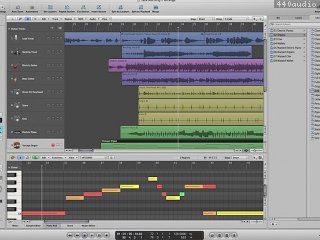
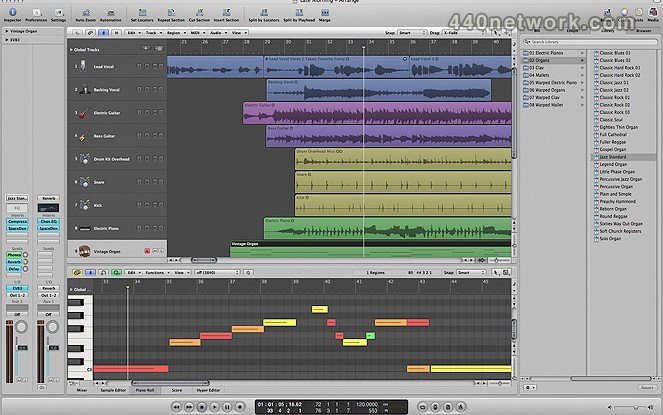
La fenêtre Arrangement de Logic Express 8 réunit les activités de production au sein d'un unique espace de travail superbement conçu. Vous pouvez enregistrer plusieurs prises, couper, déplacer ou étirer le son avec un taux de précision à l'échantillon près, parcourir les réglages de bandes de canaux, auditionner des boucles Apple Loops et déposer des accords sur votre "lead sheet". Le tout, depuis un même espace central, sans avoir à gérer plusieurs fenêtres.
- Enregistrement multiprise sans effort
La gestion de prises fondée sur les régions accélère l'enregistrement, le montage et le traitement multiprise. Un dossier de prises extensible facilite le rappel des enregistrements fractionnés, tandis que des dossiers entiers de prises peuvent être déplacés et modifiés comme des régions.
- De nouveaux outils de montage audio
Accélérez votre rythme de travail et gagnez en précision grâce à de puissantes nouveautés telles que l'accès direct à un élément transitoire, l'étirement temporel graphique et le montage précis à l'échantillon près dans la fenêtre Arrangement.
- Nouveaux instruments
Logic Express comprend désormais Ultrabeat, ES2 et l'échantillonneur complet EXS24.
- Configuration simplifiée
Des modèles prêts à la production, une fenêtre simplifiée de configuration des pistes et une fonction de création dynamique de bandes de canaux vous permettent d'être rapidement opérationnel. En outre, l'amélioration de la prise en charge de ReWire facilite l'intégration avec d'autres applications musicales.
- Accompagnement par glissement rapide
La fonction révolutionnaire d'accompagnement (ou comping) par glissement rapide vous permet de glisser les meilleurs passages de chaque prise pour créer un accompagnement fluide, enrichi de fondus pour des transitions adoucies.
- Préférences portables
Enregistrez sur votre compte .Mac vos principaux raccourcis, réglages de bandes de canaux et de plug-ins, afin de les récupérer, de les partager ou de les transférer en toute facilité.
- Nouveaux effets
Logic Express comprend désormais Guitar Amp Pro, Ringshifter et le module complet Pitch Correction.
La fenêtre Arrangement de Logic Express 8 réunit les activités de production au sein d'un unique espace de travail superbement conçu. Vous pouvez enregistrer plusieurs prises, couper, déplacer ou étirer le son avec un taux de précision à l'échantillon près, parcourir les réglages de bandes de canaux, auditionner des boucles Apple Loops et déposer des accords sur votre "lead sheet". Le tout, depuis un même espace central, sans avoir à gérer plusieurs fenêtres.
- Enregistrement multiprise sans effort
La gestion de prises fondée sur les régions accélère l'enregistrement, le montage et le traitement multiprise. Un dossier de prises extensible facilite le rappel des enregistrements fractionnés, tandis que des dossiers entiers de prises peuvent être déplacés et modifiés comme des régions.
- De nouveaux outils de montage audio
Accélérez votre rythme de travail et gagnez en précision grâce à de puissantes nouveautés telles que l'accès direct à un élément transitoire, l'étirement temporel graphique et le montage précis à l'échantillon près dans la fenêtre Arrangement.
- Nouveaux instruments
Logic Express comprend désormais Ultrabeat, ES2 et l'échantillonneur complet EXS24.
- Configuration simplifiée
Des modèles prêts à la production, une fenêtre simplifiée de configuration des pistes et une fonction de création dynamique de bandes de canaux vous permettent d'être rapidement opérationnel. En outre, l'amélioration de la prise en charge de ReWire facilite l'intégration avec d'autres applications musicales.
- Accompagnement par glissement rapide
La fonction révolutionnaire d'accompagnement (ou comping) par glissement rapide vous permet de glisser les meilleurs passages de chaque prise pour créer un accompagnement fluide, enrichi de fondus pour des transitions adoucies.
- Préférences portables
Enregistrez sur votre compte .Mac vos principaux raccourcis, réglages de bandes de canaux et de plug-ins, afin de les récupérer, de les partager ou de les transférer en toute facilité.
- Nouveaux effets
Logic Express comprend désormais Guitar Amp Pro, Ringshifter et le module complet Pitch Correction.
| Version 7.2.3 | MacOS X UB | (App) | 28 sep 2006 |
Logic Express 7.2.3 répond à des problèmes de performances lors de l'utilisation de Logic Express 7 sur ordinateurs Mac Pro et G5 Quad. Logic Express 7.2.3 est recommandé à tous les utilisateurs de Mac Pro et de G5 Quad. Pour installer cette mise à jour, Logic Express 7.2.1 ou Logic Express 7.2.2 doit déjà être installé sur l'ordinateur.
Remarque : Logic Express 7.2.3 est optimisé pour les ordinateurs Mac à processeur PowerPC G4, PowerPC G5 et Intel, dotés de 2 processeurs double cœur au maximum.
| Version 7.2.2 | MacOS X UB | (App) | 18 aoû 2006 |
Logic Express 7.2.2 offre une meilleure compatibilité avec le Mac Pro et propose:
- des performances supérieures, en tirant parti de l'architecture Mac Pro Quad-core ;
- une prise en charge optimisée des ports audio intégrés.
Logic Express 7.2.2 est recommandé à tous les utilisateurs de Mac Pro. Logic Express 7.2.1 doit être déjà installé pour procéder à cette mise à jour.
- des performances supérieures, en tirant parti de l'architecture Mac Pro Quad-core ;
- une prise en charge optimisée des ports audio intégrés.
Logic Express 7.2.2 est recommandé à tous les utilisateurs de Mac Pro. Logic Express 7.2.1 doit être déjà installé pour procéder à cette mise à jour.
| Version 7.2.1 | MacOS X UB | (App) | 24 mai 2006 |
Logic Express 7.2.1 est une version de maintenance qui répond à des problèmes isolés de fiabilité et de compatibilité dans les domaines suivants :
- Ordinateurs Mac à processeur Intel : prise en charge de ReWire et ReCycle, exportation de fichiers SMF.
- Compatibilité avec les projets de GarageBand 3 et les morceaux de Logic 7.1.
- Lecture directe des fichiers MP3.
- Ordinateurs Mac à processeur Intel : prise en charge de ReWire et ReCycle, exportation de fichiers SMF.
- Compatibilité avec les projets de GarageBand 3 et les morceaux de Logic 7.1.
- Lecture directe des fichiers MP3.
Logic Express System Requirements
* A Macintosh computer with an Intel processor
* 1 GB of RAM
* A display with 1280 x 800 resolution
* 32-bit mode requires Mac OS X 10.5.8 or later
* 64-bit mode requires Mac OS X 10.6.2 or later
* QuickTime 7.6
* A DVD drive for installation
Recommendations for Logic Express
* 2 to 4 GB of RAM for large EXS instruments
* Mac OS X compatible audio interface
* A MIDI interface and keyboard (or suitable USB device)
* A Macintosh computer with an Intel processor
* 1 GB of RAM
* A display with 1280 x 800 resolution
* 32-bit mode requires Mac OS X 10.5.8 or later
* 64-bit mode requires Mac OS X 10.6.2 or later
* QuickTime 7.6
* A DVD drive for installation
Recommendations for Logic Express
* 2 to 4 GB of RAM for large EXS instruments
* Mac OS X compatible audio interface
* A MIDI interface and keyboard (or suitable USB device)
| Logic Express 7.2.3 | (App) |
Acheter Apple Logic Express
en ligne chez: |
près de Glendora (US) chez: |
Avis
Autres logiciels par Apple
GarageBand Jam Pack Rhythm Section
Instruments Virtuels : Instruments supplémentaires pour GarageBand


Chargement...
Malgré que je sois sur principalement Cubase, je trouve ce logiciel fantastique et d'un rapport qualité prix incroyable.
C'est pour moi simplement le meilleur séquenceur en dessous de 300€.
Pas mal
Interface in / out vraiment pas claire dommage sinon conviviale