Logiciel Pour DJ
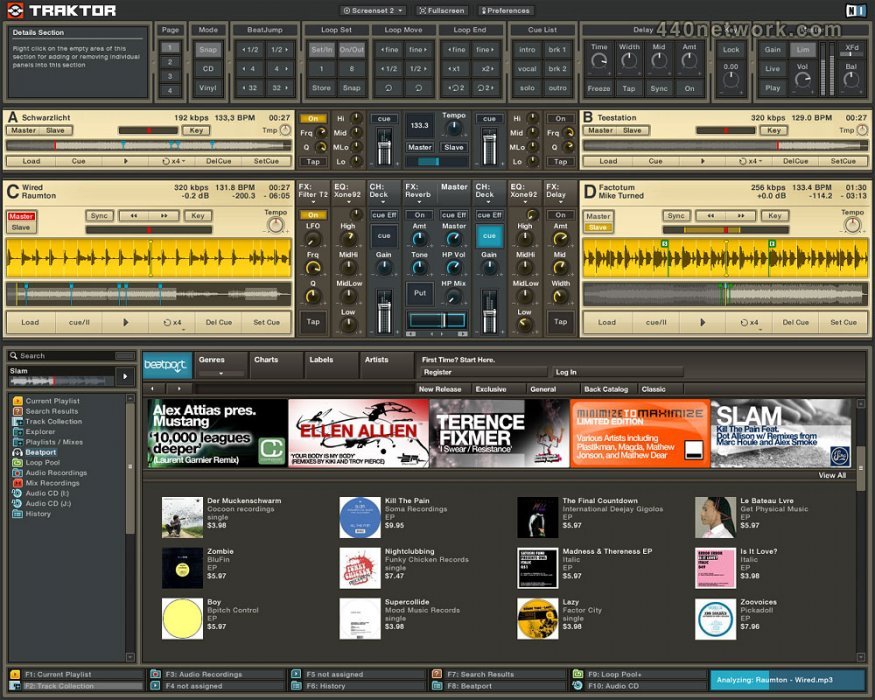
Traktor DJ Studio est un logiciel, pour DJ Professionnel qui permet de mixer en live et d'enregistrer, en utilisant des pistes au format MP3, Wav, AIFF et CD Audio.
Il possède des fonctions avancées d'affichage de forme d'onde, de reconnaissance automatique du tempo et de synchronisation, ainsi qu'une base de données des pistes avec fonctions de recherche ultra rapides.
Traktor DJ Studio est désormais remplacé par Traktor Pro
 |
Version 3.4.1 |
MacOS X UB |
(App) |
19 sep 2008 |
Master output volume meter fixed
Various potential crashes fixed
Korg Zero input mode fix
Playlist history fixed
 |
Version 3.4 |
MacOS X UB |
(App) |
4 aoû 2008 |
New and improved features:
- Unicode character support displays file names and tags in any script and language (including Japanese, Mandarin, Hebrew, Cyrillic etc.)
- "Tracking Alert" feature gives advance warning about adverse tracking conditions (e.g. dust buildup)
- Improved tracking precision when scratching in relative mode
- Various Drag & Drop improvements including "Transparent Deck Duplicate"
- Hotplugging for audio devices (Core Audio and DirectSound)
- Instant audio device switching
- Automatic device aggregation via DirectSound to use more than 2 channels
WASAPI support under Windows Vista
- Hotplugging for MIDI devices
- Support for Virtual MIDI ports on Mac OS X
- Additional Jog Wheel mode for Denon CD players
Fixes:
- Several fixes and stability improvements
 |
Version 3.3.2 |
MacOS X UB |
(App) |
22 mar 2008 |
New and improved features:
- Traktor iTunes node lists all associated iTunes folders and subfolders (no flatten view)
Fixes:
- GUI freezes and audio dropouts after several hours of use fixed
- Fluctuating Pitch while switching between Absolute/Relative/Internal modes fixed
- Tempo is not taken over when duplicating decks fixed
- Crashes after clicking in browser tree fixed
 |
Version 3.3.1 |
MacOS X UB |
(App) |
27 déc 2007 |
New and improved features:
- Improved delay and reverb buffer behaviour (prevents "spillover")
- Improved vinyl timecode tracking
- Improved timecode quality meter readout
- Additional folder structure mode that exports files without renaming
- Tap tempo reset on tap doubleclick
Fixes:
- Cueing behaviour with timecode CDs fixed
- Parameter scaling for delay and reverb effects improved
- Delay feedback and reverb size ranges increased
- Effect time parameter readout now in note values
- Beatmasher volume increase fixed
- Beatmasher on/off behaviour improved
- Tap tempo function in deck and BPM panel fixed
- Virtual MIDI port bug on OSX fixed
- Slowdown / performance issues after extended use fixed
- Long shutdown times fixed
- Various stability fixes
 |
Version 3.2 |
MacOS X UB |
(App) |
1 déc 2006 |
- Universal Binary arrives! TRAKTOR 3.2 is now fully compatible with Intel Macs.
- Create synchronized copies of tracks instantly. Remix songs in real -time by adding effects and loops. This feature opens up cool new possibilities to explore your skills in manipulating tracks. Whilst a track is playing on one deck, it's now possible to duplicate it and place it on another deck, in the exact same position and in sync with the original. From here anything is possible- create loops, add effects or get busy on the faders - push your skills to the limits as you remix a track completely on -the -fly.
- Beatport 3 now available as TRAKTOR Beatport Store. Featuring DJ, genre and other charts, plus artist and label landing pages reachable from within TRAKTOR 3. Also added is a powerful search function allowing you to find tracks in the TRAKTOR Beatport Store starting from fields in your local track library.
- Autoplay now available for TRAKTOR 3 users who prefer to hook up an external mixer.
- Tempo detection now considerably improved as well as the addition of a pre-selectable tempo range.
- Improved deck caching allows you to remix tracks live in ways not available in previous versions. Tracks can be loaded directly into memory for improved looping and cueing.
 |
Version 3.1.3 |
MacOS X PPC |
(App) |
26 sep 2006 |
Correction de bugs:
- crash au démarrage sous 10.3.9
- premières millisecondes de fichiers AAC tronquées
- crash en cherchant avec la loupe dans les listes
- crash à la fermeture
- problèmes d'enregistrement du logiciel pour les utilisateurs italiens
- problèmes multiples avec le starttime dans history playlist
...
 |
Version 3.1 |
MacOS X PPC |
(App) |
21 jui 2006 |
GUI
* New: Progress bar has been moved under the tree and can be activated individually
* New: Shortcuts have been moved under the list and can be activated individually
* New: Browser buttons labeled with icons
* New: Better visibility of sorted colum in playlist
USABILITY
* New: Loop lenghts, beatjumps and knob sensitivities recalled after restart
* New: Shows selected track in Mac Finder / Windows Explorer
* New: Shows playlists (NML) and mixfiles (NMX) in TRAKTOR Explorer
* New: Autoplay proceeds in listed sequence
* New: Undo function for sorting and for removal of tracks from playlists
* New: Recalls Master Tempo after restart
* New: Starts and pauses preview of selected track with a single command
* New: Draging playlists on occupied shortcut slots replaces shortcut
* New: Shift dragging playlists on occupuied shortcut slots appends their content
* New: Shift+Up/Dn now works for group selection in playlists
* New: Shows latest playlist as first
* New: BPM search range narrowed to +/- 2.5 BPM
* NEW: Save option in context menu of playlists
* NEW: Controlling Phase Sync via mouse scroll wheel
* New: The "Renumber" button has been replaced by a "Lock" function in the context menu of each playlist. Locked playlists do not recall changes made to them during a Traktor session. Permanent changes to playlists have to be applied in unlocked mode. Sorting by the numbered column (#) restores the original sequence of the playlist. All old playlists are initially locked by default.
INFO
* New: AAC (.m4a) metadata now fully supported (writes Traktor metadata into .m4a files)
* New: Determines total track time during import
* New: Shows number of tracks, total time and total size of selected playlist
BUGFIXES
* Fixed: Shifting beatgrids of AAC encoded files
* Fixed: Untight mix recording when usind AAC encoded files
* Fixed: Autoselection of stored loops and loop jump
* Fixed: Missing backup folder on Mac
* Fixed: Explorer does not sort playlists alphabetically
* Fixed: Wrong estimation of variable bitrates
* Fixed: Fade-In/Out markers do not work in autoplay
* Fixed: Track history in mixed playlists not correctly displayed
 |
Version 3.0.2 |
MacOS X PPC |
(App) |
1 mar 2006 |
- New: Relocating tracks in Collection, also relocates within all playlists
- New: Color coded highlights in Browser List Window
- New: 4th MIDI/Hotkey page
- Fixed: No highlights for tracks loaded in decks and preview deck
- Fixed: AAC (.m4a) problems (Beatgrids/Waveform/Audible Initial burst)
- Fixed: FLAC decoder problems
- Fixed: Import date was not set when importing
- Fixed: Crashes on computers with older Athlon processors
- Fixed: Current Playlist changed order when loading songs into decks
- Fixed: Hotkey/MIDI auto repeat was not recalled when closing Traktor
- Fixed: ID3 tags were always overwritten when analyzing
- Fixed: Impossibility to enter text in EDIT window (MAC)
- Fixed: hotkeys for auto fade were not properly working
- Fixed: Inline editing did not work for the column *rating*
- Fixed: iTunes Import overwrote the "Striped" tag resulting in a forced re-analysis
- Fixed: "Write to ID3" in the Edit dialog
- Fixed: Drag & drop of "Music Folder" did not trigger Import
- Fixed: Slash added to file path on import by drag & drop
- Fixed: Delete tracks from track collection subfolders was not working
- Fixed: "Delete" in List Window context menu did not work
- Fixed: Certain characters in tags made tracks invisible in Collection subfolders
- Fixed: Lost F-key assignments of Collection subfolders
- Fixed: "Star Ranking" field was editable 'through' the scrollbars
- Fixed: Using skip to previous button while in record caused crash
 |
Version 3.0.1 |
MacOS X PPC |
(App) |
15 déc 2005 |
- New: Instant streaming of Beatport Preview clips.
- New: Details panels are color coded according to the related deck color.
- New: Details panels can be assigned permanently to a single deck.
- New: "Growing Separators" allow to arrange Details panels right adjusted.
- New: (FS) Single turntable mode for up to 4 decks with seamless transition into internal playback mode *and* back to timecode mode.
- New: Scroll-wheel support, "ghost-pointer" and incremental sensitivities for faders and the cross-fader.
- New: Show Full collection sorted by Artist, Genre,... when clicking on the relative Collection subfolder.
- New: "No Effect" for reducing overall CPU load on slow computers.
- Fixed: The import process from Traktor DJ Studio 2.x collections did not automatically import the Stripes folder.
- Fixed: The Beatport Online Store did not work on Mac OS X 10.4.3.
- Fixed: Master output meters did not work in External Mixer mode.
- Fixed: Hotkey control got lost in certain situations.
- Fixed: crash when attempting to open history files.
- Fixed: impossible numeric entry into the master clock tempo.
- Fixed: crash when exporting playlists for printing.
- Fixed: pitch skips when switching decks in single timecode mode.
- Fixed: auto-repeat on incremental tempo changes.
- Fixed: "Hold" is now default when assigning a hotkey to a triggered function (in version 3.0.0. "Toggle" was default).
- Fixed: Native Mix recording did not preserve Key-Lock settings when recording pitch-bends.
- Fixed: Native Mix Recording did not correctly record tempo synched master effects.
- Fixed: Tempo-Skips when overdubbing Native Mix with Key Lock enabled
- Fixed: Starting Native Mix recording reset tempo on Deck A & un-slaves the decks
- Fixed: Cut button in Audio Recording panel was not working
- Fixed: FS2 - audible artifact when switching to vinyl mode
- Fixed: Play counter was not working
- Fixed: List Select PgDn/Up skipped too much
- Fixed: Connecting external drive caused Traktor to hang
...and more bug fixes and performance optimizations.
 |
Version 3.0 |
MacOS X PPC |
(App) |
13 déc 2005 |
- 4 platines
- 5 effets DJ synchronisés au tempo : Delay, Reverb, Flanger, Beatmasher et filtres assignables au LFO
- Magasin de téléchargement en ligne Beatport Music
- émulation de mixer DJ 4 canaux Allen&Heath Xone:92
- affichage de forme d'onde interactif
Voir toutes les nouveautés
 |
Version 2.6 |
MacOS X PPC |
(App) |
25 fév 2005 |
- Compatibilité avec FinalScratch 2
- Compatibilité WMA et AAC
- Broadcasting Internet
- Enregistrement de signal entrant, micro ou ligne, incorporable au mix en cours
- Export du mix directement en WAV ou AIFF
- Amélioration du navigateur et des fonctions de playlists (historique, bookmarks, impression…)
- marqueurs '1 minute' dans la fenêtre de forme d'onde
 |
Version 2.53 |
MacOS X PPC |
(App) |
11 jan 2004 |
- Optimisation du Time Stretching
- Time Stretching additionnel de basse qualité (consommation moindre de CPU)
- Plus grande échelle de Time Stretching (de 0.25 à 2.5)
- Amélioration de la stabilité du tempo
- Bouton Set Cue (réintroduction de cette fonction présente dans la version 2.1)
- Lock Playing Deck toujours disponible pendant l'Autoplay
 |
Version 2.52 |
MacOS X PPC |
(App) |
1 nov 2003 |
- Problèmes de compatibilité Panther corrigés
- Collection saving : empêche la fermeture avant compète sauvegarde de collection
- Mix Cues : détection améliorée des marqueurs de track dans les mix enregistrés
 |
Version 2.51 |
MacOS X PPC |
(App) |
1 jui 2003 |
- Support du tag TKEY (Key Signature ID3v2)
- Le Producer Tag est maintenant écrit au standart ID3v2 composer (TCOM)
- Redimensionnement possible de la hauteur de fenêtre du navigateur
- L'Autoplay une fois activé n'annule plus les changements de pitch
- Les informations de longueur de track peuvent être retrouvées à partir des tags ID3
- Fonction aller au début / à la fin du track
 |
Version 2.5 |
MacOS X PPC |
(App) |
1 jan 2003 |
Traktor DJ Studio 2.5 est doté d'un système d'expansion/compression temporelle remodelé qui permet de changer le tempo (indépendamment du pitch) jusqu'à +/- 30 %, ou le pitch (sans prendre en compte le tempo) jusqu'à six demi-tons, sans artéfacts perceptibles.
Voici aussi ce qu'on trouve dans cette nouvelle version :
- interface visuelle améliorée avec vue totale des pistes pour chaque platine
- intégration CAO pour la synchronisation des données à travers les réseaux
- compatibilité totale avec Final Scratch
- système de boucle en continu
- paramétrage d'écran personnalisé
- support complet pour les playlists iTunes
- remplacement à chaud des unités extérieures
- reconnaissance du volume/du tempo à l'importation.
Domage que dj console ne marche pas avec!
C#est cool
Peut etre le meilleur logiciel de mixage pour les DJ