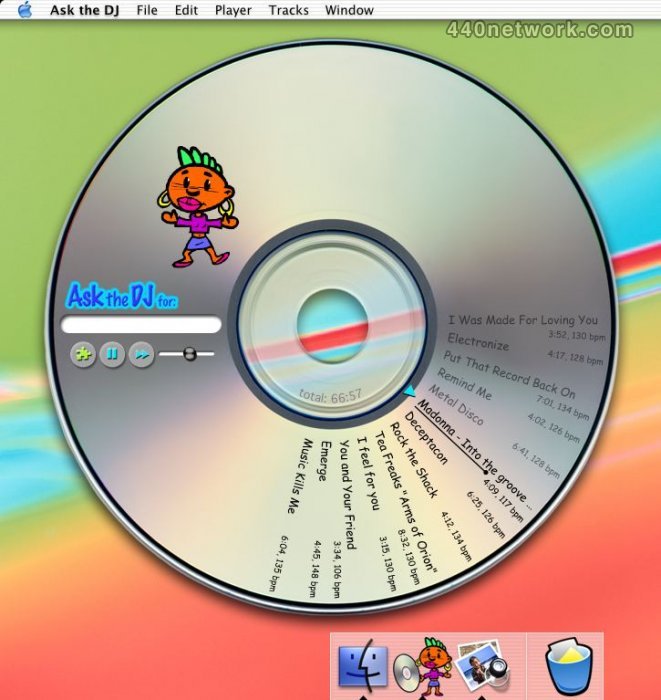
analyses beat and performs DJ-like cross-fades automatically
AskTheDJ analyses beats to perform truly seamless transitions between tracks. Like a real DJ, it matches beats and adapts tempos whenever needed so the music always flows, even when cross-fading between tracks with different bpms.
AskTheDJ also cuts unrhythmical intros and outros, and levels volume. Better yet, all this is done automatically. You just need to click Play and dance. You can also export Ask the DJ's mix art to audio files, suitable for burning audio CDs. AskTheDJ produces perfect transitions, even when mixing tracks with different tempos.
 |
Version 2.0.3 |
MacOS X UB |
(App) |
Jul 23, 2010 |
-Fixed an issue that prevented tracks from being dropped from iTunes 9.2.
-Fixed an issue that could prevent the application from starting when the "Comic" font was not installed.
-Fixed an issue that prevented proper display of Japanese characters on some systems.
 |
Version 2.0.2 |
MacOS X UB |
(App) |
Apr 8, 2008 |
-Fixed an issue that could prevent the application from starting under Mac OS X v10.5 ('Leopard').
-Improved activation key format so keys are not corrupted in email transmissions.
 |
Version 2.0 |
MacOS X UB |
(App) |
Jan 24, 2007 |
Version 2.0 is a universal binary. It fixes an issue that affected CoreDuo processors.
 |
Version 1.6 |
MacOS X PPC |
(App) |
Apr 4, 2004 |
-Japanese version available
-Support for track titles in NiceCast (1.5.1 and up)
-Improved smoothness and stability
-Fixed problem that could lock track search if a corrupted mp3 tag was encountered.
-Fixed a bug that could crash the application while mixing some track combinations.
-Non-44.1 kHz tracks are properly filtered out, as they should always have been.
 |
Version 1.5 |
MacOS X PPC |
(App) |
Jan 24, 2004 |
- Improved track browser.
- iTunes-like appearance (stripes).
- Columns can be moved.
- Column layout is saved accross sessions.
 |
Version 1.4 |
MacOS X PPC |
(App) |
Oct 24, 2003 |
- Includes track browser.
- Works with Unicode (Japanese script support).
- Includes French version.
 |
Version 1.3 |
MacOS X PPC |
(App) |
Sep 10, 2003 |
- Now also searches FAT ('MS-DOS') volumes (such as iPod portable players) for music.
- Now also plays AAC protected tracks (.m4p) -- some restrictions apply.
- Character animation is now optional.
- Fixed bug that could crash the application when exporting.
- Fixed problem that could cause the player to 'skip'.
A lot of Thanks for nice application!!!
ican not difficult English, I am very happy Music life!
thanks you. ayumix828@yahoo.co.jp or chemuler88@mac.com
I registered this because I had a party emergency, where I had to be both host and DJ, so couldn't hover over mixing board all night. It worked as advertised and as per the job description I would rate it somewhere between Very Good and Excellent. As far as I can tell, there's no other software on the market that offers the beatmixing, set-it-and-forget-it, no-dead-air features of Ask The DJ.
However, there are several missing features that drag ATDJ down to merely Good. They are related mostly to timing information.
1a. There is no total time of a playlist. Perhaps this is because of the beat-mixing feature, but even an approximate guess would be more useful than none at all. Why? Because I needed to know if I had, say, about an hour of music cued up and could then go be a host for 50 minutes.
1b. ATDJ features a playlist-export feature to burn you mixes, but unless you know how long the playlist is, you don't know if it will fit onto a CD or not. 1a & b knocked off a star.
2. You can't toggle song length information -- e.g. total time, played time, and (most important) remaining time for a song. This is a basic DJ feature of any digital playback mechanism, be it from CDs or from HD. I didn't need it for the party, but all the same it should be there. There is a progress bar that proceeds through the song, but it's not as accurate as a countdown (or even looking down at a needle to see how many grooves are left in a track on an LP).
3. And finally, even though you can export the songs from a mix to burn to CD, you can't export the playlist! After the party I wanted a list of the songs I had played so I could share it with people, but there was no way to get it out of ATDJ. And the same applies if you are burning a CD. The only way to print the songs onto a jewel-case insert is to TYPE THEM OUT BY HAND! This cost another star, and is a glaring error.
However, if you don't need to know how long your playlists are, or have a list of what you're playing, then I can recommend this software.