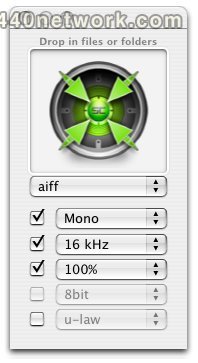
SoundConverter is a Cocoa OSX application for converting sound files between different sound formats. It is free for files under 500K and $10 for license. Note that not all wav and wma encodings are supported.
input formats :
4xm, 8svx, ac3, aif, aifc, aiff, al, au, auto, avi, avr, cdr, cvs, dat, dv, fap, ffm, flac, gsm, h263, h264, hcom, ircam, la, lu, m4a, m4v, mat, mat4, mat5, maud, mov, mp2, mp3, mpc, mpeg, mpegts, nist, nul, ogg, paf, prc, pvf, raw, redir, rm, rtp, rtsp, s16be, s16le, s8, sb, scm, sd2, sdp, sf, sffd, shn, sl, smp, snd, sndt, sph, svx, sw, swf, txw, u16be, u16le, u8, ub, ul, uw, vms, voc, vorbis, vox, w64, wav, wma, wve, xi
output formats :
8svx, aac, ac3, aif, aifc, aiff, al, au, auto, avr, cdr, crc, cvs, dat, dv, fap, ffm, flac, gsm, h263, h264, hcom,...
more...
SoundConverter is a Cocoa OSX application for converting sound files between different sound formats. It is free for files under 500K and $10 for license. Note that not all wav and wma encodings are supported.
input formats :
4xm, 8svx, ac3, aif, aifc, aiff, al, au, auto, avi, avr, cdr, cvs, dat, dv, fap, ffm, flac, gsm, h263, h264, hcom, ircam, la, lu, m4a, m4v, mat, mat4, mat5, maud, mov, mp2, mp3, mpc, mpeg, mpegts, nist, nul, ogg, paf, prc, pvf, raw, redir, rm, rtp, rtsp, s16be, s16le, s8, sb, scm, sd2, sdp, sf, sffd, shn, sl, smp, snd, sndt, sph, svx, sw, swf, txw, u16be, u16le, u8, ub, ul, uw, vms, voc, vorbis, vox, w64, wav, wma, wve, xi
output formats :
8svx, aac, ac3, aif, aifc, aiff, al, au, auto, avr, cdr, crc, cvs, dat, dv, fap, ffm, flac, gsm, h263, h264, hcom, ircam, la, lu, m4v, mat, mat4, mat5, maud, mp2, mp3, mpeg, mpegts, nist, nul, ogg, paf, prc, pvf, raw, rm, rtp, s16be, s16le, s8, sb, sd2, sf, shn, sl, smp, snd, sndt, sph, svx, sw, swf, txw, u16be, u16le, u8, ub, ul, uw, vcd, vms, vob, voc, vorbis, vox, w64, wav, wve, xi
less...

 MacOS X Intel
 Windows


You must sign-in to post your comment:
You can signin with your 440Software account (MacMusic, PcMusic, 440TV, 440Forums, 440Software, ...) or via FaceBook, Twitter or Google.