Smart randomization algorithm - new smart randomization engine randomizes everything reasonable parameter in the plugin, including modulators, and chooses settings wisely for much better results. On easy screen only multiparameters are randomized.
Added AGC (automatic gain control) which ensures the output sounds as loud as the input making preset browsing and randomization much easier.
Added lots of presets for most creative plugins.
Ultra-advanced follower borrowed from MDynamics engine is now used in every modulator (+hold, attack/release shape and much more...)
Oscillators can now load custom samples (WAV, MP3, FLAC) and mix them with other sources (oscillator, envelope, step sequencer).
Ctrl+click on a "Presets" button loads a random preset.
Added global modulator switch, presets and randomizer.
Added band presets and band randomizer for multiband plugins.
Added signal generator shape menu images, presets and randomizer.
Added denoiser active preset for MSpectralDynamics.
Added active presets for MDynamicEq and MAutoDynamicEq.
Switched to VST3 3.51.
MBandPass: All filters except 6dB/oct are now resonant, added gain & dry/wet.
MLoudnessAnalyzer: Added true-peak meter, offset parameter.
MUtility: Added dual panorama.
Added Hold parameter for the modulator follower mode.
All momentary & short-term loudness meters now have maximum value indicator.
Delay mode is now "classic" by default.
"Auto-tune" panel in MAutoPitch renamed due to copyright law violations.
Fix: MLoudnessAnalyzer's loudness range meter didn't use correct ballistics.
Fix: Harmonizer in granular mode crashes when upsampling and high grain size.
Fix: MLoudnessAnalyzer wasn't resizing when multiple channels have been set.
Fix: A few compatibility issues, upgraded to VST 3.51.
Fix: Analyzers didn't work correctly in left + right mode.
Huge memory and GUI optimizations, new knob based interfaces.
Each oscillator can now also be controlled using harmonics instead of shape.
Added "double" envelope shape type.
Analyzer & sonogram can now optionally be enabled even when the GUI is hidden.
A-H presets now send automation when changed.
MIDI note controllers now react on pitch-bend immediately.
Added feedback phase invert and saturation for phasers.
Added second tape mode for flangers.
Added knob mode for most plugins, which turns their slider based GUI into knob based one.
MSpectralDynamics can now capture the threshold curve based on the input signal.
MDynamics and MMultiBandDynamics weren't showing correct shapes for upwards expander.
Added IR phase invert and left/right delays for MMultiBandConvolution.
Fix: Drag & drop wave file for analysis didn't work in MAutoEqualizer.
Fix: MAutoEqualizer could crash under specific circumstances when automating gain.
MAutoEqualizer 5.01 compatibility update changes
* Surround is now off by default, because it causes problems with some hosts (known are FL Studio and Studio One). If you use surround processing, please enable "Activate surround" in the plugin settings, it will enable all plugins at once.
* Plugins can now access additional volumes on Mac OS X.
* Band editor in equalizers doesn't close when clicking on a band type any more and shows filter steepness.
* Fix: Plugins could crash in AU when requested mono to stereo configuration.
* Fix: Styles are now moved to user data folder, because some computers have permission problem with all-users directory.
* Fix: MFilter caused massive gain in parallel mode in some special circumstances.
* Fix: Analyzer in equalizers didn't show correct spectrum if activated after upsampling change.
* Fix: MMultiBandConvolution didn't remember custom paths correctly on Mac OS X.
MAutoEqualizer 5.00 changes
* Dual user interfaces - most commercial plugins now contain 2 interfaces, a simple default one with several predefined modes, but just a few controls, and an advanced one. This makes the plugins not only extremely versatile, but also quick and easy-to-use.
* Unique new analysis engine for MAnalyzer and all equalizers - new analysis engine is faster, more accurate and provides a whole new range of unique features, such as micro-sonograms, full sonograms, super-resolution (providing high resolution for low frequencies keeping speed for the high frequencies), prefilters (for loudness curves) or deharmonization (for easier fundamental frequencies analysis).
* Plugins are now categorized under VST and VST3 - with more than 55 plugins it started to be hard to find the plugin you need, therefore they are now categorized by purpose to Dynamics, EQs etc. With VST3 they also fit the standardized structure in your host (if it supports it).
* Added next/previous preset buttons.
* Added A/B switch to swap between previous two A-H presets.
* Added reset and collapsible band editor for equalizers.
* Added visual areas for equalizers.
* Added autolisten feature to parametric equalizers.
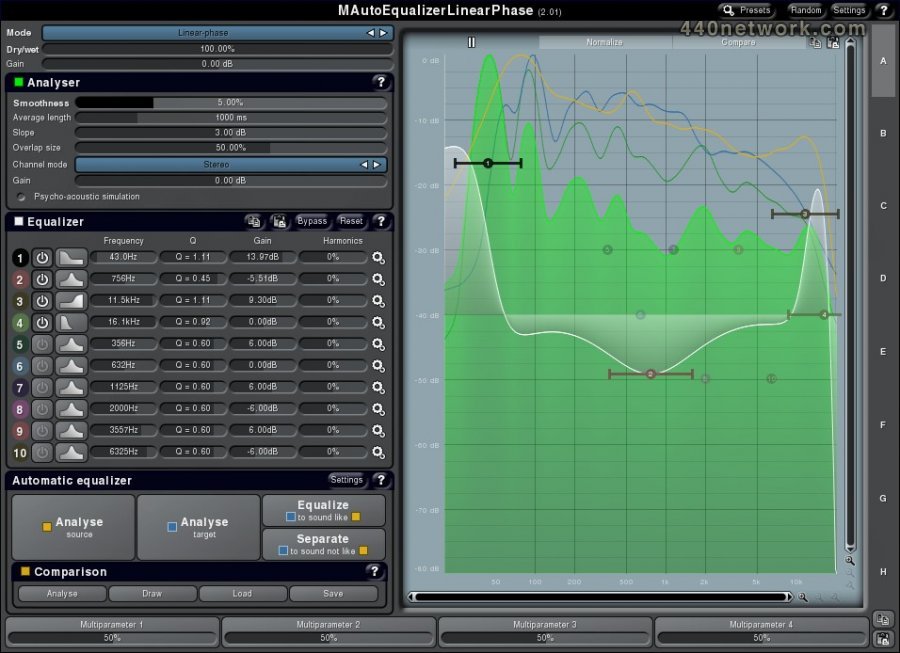
* MAutoEqualizer GUI completely restructuralised for easier workflow.
* Added 0% & 100% modes for global dry/wet for all multiband plugins.
* Increased accuracy when dragging Q in equalizers.
* Added "use first parameter's range" mode for modulators and multiparameters.
* Added a few shortcuts to control zooming in graph editors.
* Added global surround switch useful to make the plugins more compatible with some hosts.
* Added resizing arrow for resizable windows.
* Added smooth 2 envelope point mode.
* Upsampling range extended to 16x.
* Multiband peakmeters can now show different channels in surround.
* Optimized preset and settings storage.
* Preset exchange is now enabled by default, can be disabled in Settings.
* Band enable buttons have been removed for equalizers, instead the icon is clickable.
* Added single-pole (6dB/oct) lowpass & highpass filters for equalizers.
* Fix: Resizing windows with splitters changed ratio of the splitters.
* Fix: Resizable windows were sometimes showing arrow cursor over a position, where the window couldn't be resized.
* Fix: Demoversions with sidechain were crashing occasionally.
* Fix: Plugins with sidechain were occasionally crashing on Mac AU.
* Fix: A Windows message was poping when trying to access an unavailable drive.
* Fix: Upsampling latency wasn't reported correctly.
* Fix: Improved automation support with Ableton Live.
* Fix: Plugins didn't store bypass state.
* Fix: Multiparameters in switch mode were showing inverted state.
* Fix: Alt+Click in a graph editor caused maximum zoom, which is now disabled.
* Fix: Units in zoomed mode were sometimes showing invalid grid lines.
* Fix: Temp gain wasn't updated when automated/modulated.
* Kernel heavily upgraded and optimized.
* Smart-learn feature for all modulators & multiparameters - just enable it and move anything in the plugin and the modulator/multiparameter will learn what parameters you used including intervals.
* A-H presets can be switched via program change MIDI message.
* MAutoEqualizer bypassed temporarily when computing new settings.
* Last randomization can be undone by holding shift and pressing Random button.
* Optional confirmations on destructive actions.
* Added bypass to the title.
* Fix: Single band case hasn't compensated for latency correctly.
* Fix: MIDI & general settings save/load.
* Fix: Disabling modulator resets original parameter values incorrectly.
* Fix: Preset selector couldn't expand/collapse folders.
* Fix: MAutoEqualizer reset didn't reset all parameters.
* Improved upsampling algorithm performance.
* Improved compatibility with several hosts.
* Fix: Latency reporting.
* Fix: Plugin reset removing tails.
* Fix: Multichannel processing wasn't optimized enough and caused crashes.
* Fix: AU MIDI input.
* Fix: Denormalization problems causing high CPU usage when processing silence.
* ABCD morphing feature.
* High-quality upsampling engine.
* Improved Windows 64-bit and Mac OS X compatibility.
* Immediate editor resizing.
* Kernel optimizations.
* Graph rendering optimized.
* Randomization improved to apply only on useful parameters.
* Improved Mac OS X installer.
* Fix: Text value editing in modulators, MIDI controllers and multiparameters.
* Fix: Drag using trackers outside of window caused jumping to the other side.
* Fix: Upsampling controller sometimes contained invalid value after loading.
* Added phase control.
* Preset export/import.
* Preset storage optimized.
* Fix: Modulator could replace values on loading presets.
* Fix: Added modulator target did not preserve original value.


 MacOS X Intel
 Windows


You must sign-in to post your comment:
You can signin with your 440Software account (MacMusic, PcMusic, 440TV, 440Forums, 440Software, ...) or via FaceBook, Twitter or Google.