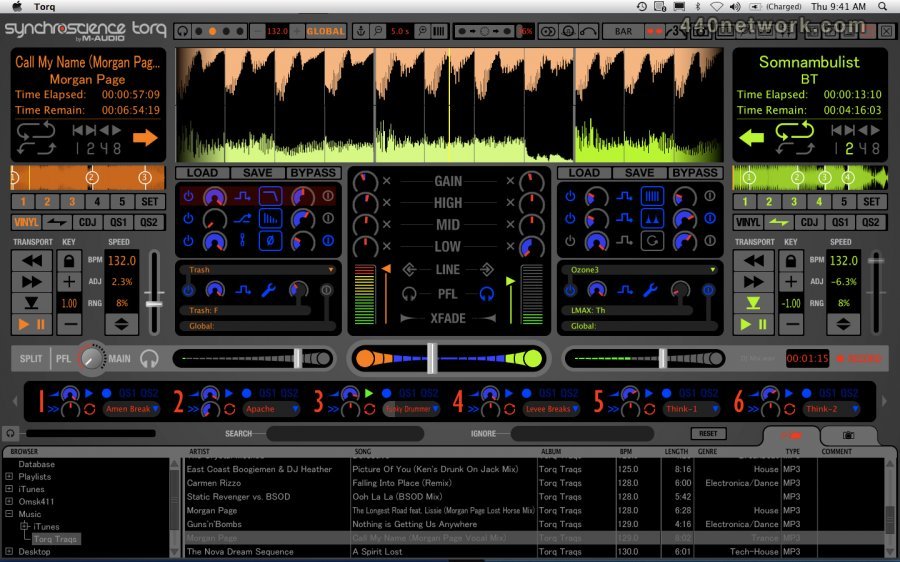
DJ Performance and Production Software
Torq software features:
- cue, beat-match and mix digital audio files (including MP3, AIFF, WAV, WMA, AAC and CD audio)
- seamlessly integrates with select M-Audio DJ hardware
- organizes digital audio files (including iTunes libraries) into an easily searchable database
- supports optional third-party VST effects
- ReWire support
- 2 virtual decks for loading and playing files
- 2-channel mixer with 3-band EQ, gain and level controls, headphone cueing and crossfader
- snapshot function for instant recall of mixer and effects settings
- 16-cell, tempo-synced sampler
- integrated performance recorder
- vinyl, CDJ and hybrid emulation control modes
- control digital files with traditional DJ hardware using Torq Control Vinyl and Torq Control CDs
- controllable via mouse, keyboard and/or MIDI controller
compatible with Pro Tools M-Powered
 |
Version 2.0.3 |
MacOS X Intel |
(App) |
Dec 3, 2011 |
Updated Compatibility with Mac OS X 10.7.2 (Lion)
TRQ-2759 – In Torq 2.0.3, enabling/disabling Network devices such as Ethernet or Wireless after Torq has been activated will no longer cause Torq to lose its activation.
TRQ-2753 –Torq 2.0.2 no longer hangs with a blank screen upon launch on 10.7
TRQ-2775 – Fixed issue with Torq 2 receiving MIDI Beat Clock on Mac OS X.
TRQ-2564 – Playlist sorting order is now independent from database and file sorting order.
TRQ-2772 – Torq 2.0.3 resolves an issue where rapidly triggering snapshots to load/unload effects to a deck could cause Torq to crash.
TRQ-2693 – Fixed and issue where rapidly triggering 2 snapshots (one is a swapped duplicate of another) could result in effects being stuck in the decks.
TRQ-2755 – Fixed a vulnerability where Torq could crash when selecting iTunes playlist that has duplicate tracks.
TRQ-2761 –Holding shift while turning a MIDI knob no longer resets to the knob to its default value.
TRQ-2760 – Fixed: Torq Engine not responding message could appear for several minutes while Torq loads if DB Glitch VST plug-in was left loaded on a deck.
TRQ-2521 – Improved stability when searching iTunes library on OS X.
TRQ-2270 –Torq will now delete empty playlists on exit if no songs are played.
TRQ-2735 – Fixed an issue where users are unable to drag playlist entries up more than 1 space at a time.
TRQ-2758 – Fixed: If the Windows 7 Taskbar is docked to the left, minimizing and maximizing Torq will cause the window to be shifted off screen in a way that the min/max/close buttons are unavailable.
TRQ-2756 – Fixed: Unsyncing an NS7 Track in certain circumstances will cause the track to jump to the pitch slider tempo without updating the BPM.
 |
Version 2.0.2 |
MacOS X Intel |
(App) |
Jul 11, 2011 |
- Support for the Numark NS6, MixTrack, and MixTrack Pro controllers
- Compatibility with OGG and FLAC audio formats
- Mapping fix to enable use and create mappings for multiple instances of single deck controllers. (ie. Kontrol X1)
- Fixes in handling fields in database
- "Scanning VST" window on popup now disabled by setting both VST directories to "No"
- On/Off buttons now trigger on press and disengage upon release, to correctly emulate hardware characteristics
- Many more performance enhancements and fixes
 |
Version 2.0.1 |
MacOS X Intel |
(App) |
Apr 1, 2011 |
Free update enhances stability and improves workflow
 |
Version 2.0 |
MacOS X Intel |
(App) |
Jan 13, 2011 |
- 4 full-featured decks
- Standalone functionality—no hardware peripherals required
- Compatible with select third-party audio interfaces and DJ controllers including Numark NS7, Vestax VCI-300, and others
- 13 high-quality built-in effects including filter, phaser, strobe, delay, flanger, reverb, distortion, repeat, brake, reverse, and more
- Patent-pending Traq Morph feature transforms your sound with unique filter, cut, duck, and morph effects as you crossfade between tracks
- Up to four simultaneous effect inserts per deck
- Completely new user interface design
- Remove sections from screen to conserve space
 |
Version 1.5.2 |
MacOS X UB |
(App) |
Jul 27, 2009 |
Torq 1.5.2 delivers several bug fixes and enhancements based on user requests from the Torq community.
 |
Version 1.5 |
MacOS X UB |
(App) |
Jan 27, 2009 |
Improved Tempo/Pitch Alteration
Tempo Anchors allow marking tracks with varying tempos—Torq's effects and samples follow the tempo changes in the song
Tempo Anchors enable you to eliminate tempo variations, making it easy to mix varied songs
Tempo Master assigns a playing track to serve as the master tempo source for all tempo-related functions
zPlane Elastique time-stretching/compression technology for sophisticated beat matching and pitch alteration
Advanced MIDI Control
transmit/receive MIDI beat clock for sync with other hardware/software and easy switching between DJs
MIDI soft takeover prevents parameter jumps when using external controllers
New User Interface Features
Hide Mixer option conserves screen space
preview songs in headphones before loading to deck
new databse categories for bit rate, file type, year and label
select multiple files to add to playlists
Musical Style Preferences improve results when analyzing tracks
drag and drop songs into decks while in browser max view
warning message if loading a new song onto a Deck that is playing
warning message when attempting to exit Torq
optimized control locations
intuitive toolbar buttons and MIDI/tempo indicators
Global Tempo metronome can be monitored in headphones
Auto Gain feature matches the gain levels between decks
Enhanced Effects Processing
internal effects can be grouped into effects chains
VST effect tempo synchronizes with tempo of playing deck
effects can be used in a post-fader configuration
Rock-Solid Integration with Traditional DJ Hardware
Skip Protection keeps the music playing even if the Control Vinyl or CD skips
True Key Lock keeps the pitch constant when adjusting external turntable speed
New Looping Functionality
Loop points can be set after a section plays
new QuickLoop option for CDJ-style loop division
Quantize function for start/stop accuracy