DJ mixing
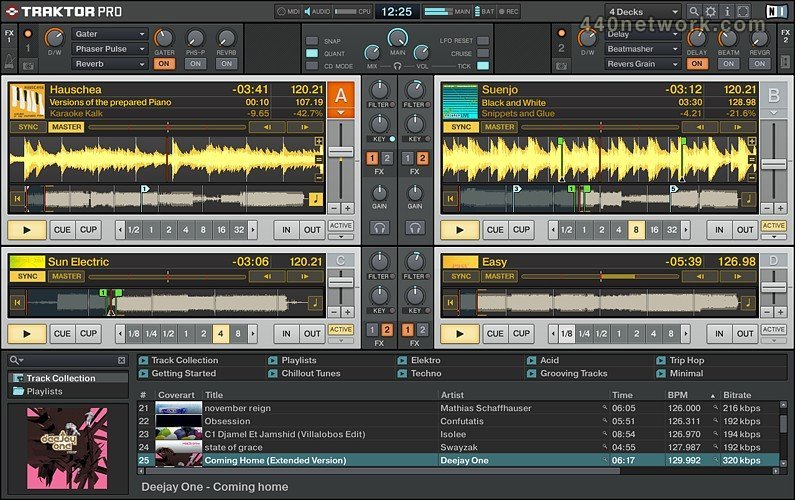
Result of years of DJ software development, TRAKTOR PRO has been designed to perfectly meet professional DJs' needs. Incorporating streamlined industry-standard workflows, 21 creative new effects, pre-assigned yet flexible MIDI mapping of all major controllers on the market, premium sound quality and up to four playback decks, TRAKTOR PRO redefines the art of DJing.
Features :
- four decks
With four decks, TRAKTOR PRO makes adding tracks, loops or samples a breeze. Ultra-precise beat detection and an automatic beat-grid give you the BPM readings you need for mixing, while the new Sync Lock function ensures that beat-matched tracks never drift out of time. Intelligent loop and cue functions let you easily deconstruct and remix tracks on the fly, while the master tempo detection allows you to play with four decks and FX all sync'd automatically.
- fx
Each of the four decks integrates legendary Allen & Heath Xone: 92 4-band EQ and filters, giving you full control of the entire frequency spectrum. For more drastic sound transformation, the incredible TRAKTOR PRO effects suite contains 21 effects chainable in groups of up to six at a time and controllable in either "easy" or "pro" mode. Everything from studio-quality delay and reverb to unique tempo sync'd performance effects such as IceVerb, Bitcrusher, Ring Modulator and Reverse Grain are included, all built with Native Instruments' groundbreaking REAKTOR technology.
- interface
Designed for the toughest of club environments and with detailed input from professional touring DJs, TRAKTOR PRO now features a user interface that truly excels in its simplicity, functionally and practicality. The interface groups together functions for logical and intuitive workflows, and is presented in a stylish design that remains highly readable from a distance. Featuring several different templates set up for different DJing styles, the interface is also completely customizable to your own specific requirements.
- browse
Crate Flick lets you browse your track collection using cover art, showing you the top portion of each track's cover as you flip through, just like digging in a record box. TRAKTOR PRO helps you quickly find tracks visually and even works with file formats that would normally not support artwork (AIFF, WAV). All metadata for your track collection is now fully portable, making it simple to switch between different computers. Controller settings and layout information is also transferable, ensuring TRAKTOR PRO delivers a new level of usability.
- workflow
TRAKTOR PRO utilizes tried and tested processes that will be familiar to any pro DJ. Industry-standard workflows have been fully integrated into TRAKTOR PRO, whether using hotkeys, a mouse or a MIDI controller. Play, cue, hot cues, loop setting / adjusting, and jog wheel control behave in the same way as leading CD units, while portable track info and performance settings let you customize how TRAKTOR PRO works for you.
- flexible dj setup
TRAKTOR PRO is completely flexible. You can use your mouse and keyboard or a MIDI controller—all major controller brands now feature pre-mapped yet fully customizable MIDI assignments for TRAKTOR PRO. You can also upgrade to TRAKTOR SCRATCH PRO, and utilize turntables or CD decks to control your setup. An expansion pack for TRAKTOR PRO users includes the DVS plug-in, AUDIO 8 DJ interface, Multicore cables and vinyl and CD control discs.
 |
Version 2.5 |
MacOS X Intel |
(App) |
May 24, 2012 |
INNOVATIVE REMIX DECKSô
- Remix Decks are the latest TRAKTOR innovation, letting you select from up to 64 loops and one-shot samples per deck. Any of the four decks in TRAKTOR PRO 2.5 can be switched to be a Remix Deck
- Each Remix Deck offers four different Slots (columns), ideal for arranging sounds and loops by instrument groups e.g. different drum, bass, percussion loops. Play one sound per column - a total of four samples at any one time.
- Use loops from the included sound content or import any loops and sounds of your own
- Develop your own unique trademark sound and build a personal arsenal of sounds by live-capturing your favorite loops while DJing
A NEW WAY TO PERFORM
- The stylish multi-color pads and ergonomic faders make TRAKTOR KONTROL F1 the ultimate controller for a Remix Deck. Any sound or loop can be assigned a specific RGB color, either in the software or via the controller
- A Remix Setô is the combination of 64 loops and one-shot samples and their respective beat grids and BPMs - stored and loaded just like a regular track in the browser
- Control the entire Remix Deck via Native Scratch timecode control with vinyl or CDs - or scratch using the TRAKTOR KONTROL S4/S2 jog wheels. Each Remix Deck has its own transport, sync, and tempo master controls
DEEP CONTROL
- To add more flavor you can choose which slots are fed through TRAKTOR’s FX units, or even play samples in reverse
- The Punch mode allows for instant switching between different loops in one instrument group, in perfect phase - switch from one drum loop to the next exactly on the 2 and 4 snares
- Additionally, the Remix Deck quantize can be set to different values for full control of the musical phrasing
IMPROVED BPM DETECTION
- Rewritten tempo detection for improved accuracy, developed from analysing thousands of tracks from various genres
- New “downbeatî auto-detection improves auto-beat-gridding and phase recognition
- Convenient analysis options when importing files to your collection - set the tempo range by BPM
- Much improved BPM detection on tracks with variable tempo, (such as “liveî drummer genres) - now detects average BPM
- Rewritten Tempo-Tap – instant and simple realignment anytime your tracks drifts away from the grid over time
- Manually adjusted grids, (and all BPM-locked tracks) keep their position and tempo from previous versions
 |
Version 2.1.2 |
MacOS X Intel |
(App) |
Dec 12, 2011 |
MIDI Clock send/receive stability improved
Cueing issues with CD Timecode fixed
Track start position offset with timecode media fixed
CUP instant mode with "Quant" enabled fixed
CUP instant mode for decks B/C/D fixed
Built-in soundcard fall-back fixed
MIDI controls "Tempo Sync", "Load Loop Play", "Load From List" and "Track End
Warning" fixed
Drag & Drop from preview player to deck fixed
TAP when working with beatgrids fixed
Reset deck controls for pitch fader fixed
Issues when loading a missing sample to a sample slot fixed
Issues with ASIO control panel for some 3rd party devices fixed
Crash when removing Traktor Kontrol X1 fixed
 |
Version 2.0.1 |
MacOS X Intel |
(App) |
Mar 30, 2011 |
- Optimized used interface + TruWave:
* TruWave waveforms offer a whole new dimension to your mix - differentiate between kicks, hi-hats and snares and anticipate your mix
* Thanks to various zoom levels, set up tighter cue points than ever before
* The overview of the whole track ("stripe") clearly displays the track's arrangement with full detail
* New layouts, including Essential View for maximum ease-of-use when using TRAKTOR with external mixer and controller(s)
- Sample Decks
* Grab and layer your own loops or use the included loop content. Create one-shot samples or use the included DJ Craze scratch sounds
* Grab loops live out of a running deck, store your favorites in the loop library, and develop your own arsenal of beats and sounds
* Layer up loops in perfect sync with the decks
* PRO versions only: Tweak the volume and filter for each Sample Deck slot separately
* PRO versions only: 2 different sizes for the Sample Decks; each of the 4 decks can be switched from track deck to Sample Deck and vice versa, on the fly
- New effects
* Tape Delay, Ramp Delay, Bouncer and Auto Bouncer join the arsenal of professional DJ effects, taking the potential for sound mangling to the extreme
* With a multi-channel audio interface such as the TRAKTOR AUDIO 10 you can now use TRAKTOR effects as an independent send / receive effects unit
- Included loop content
* 40 original loops and 10 full tracks drawn from Loopmasters' new DJ Mixtools series, plus additional scratch sounds by DMC Champ DJ Craze
* Drum, bass, percussion and synth loop in dubstep, minimal, house, techno and trance styles
* Grab loops from any playing track in seconds, and save them in the loop library
- Loop recorder
* Trigger the recording using a foot pedal, a DJ controller such as TRAKTOR KONTROL X1 or a keyboard hot key
* Overdub on top of the running loop in real time, creating additional layers and heightening dramatic FX buildups and peaks
* Works like a 5th deck. You can transfer the layered loop into a Sample Deck slot instantly, freeing up the Loop Recorder for further use
 |
Version 1.2.7 |
MacOS X Intel |
(App) |
Nov 12, 2010 |
New functionality:
* Resolution for "tempo" parameter increased
* "Snap/Vinyl" mouse mode enabled for Traktor Duo / Traktor Scratch Duo
Fixes:
* Caching and waveform display issues with AAC files fixed
* Startup crash on system sample rate mismatch fixed
 |
Version 1.2.6 |
MacOS X Intel |
(App) |
Apr 30, 2010 |
* Crash when pressing delete button of empty track fixed
* Random crashes while editing playlists fixed
 |
Version 1.2 |
MacOS X UB |
(App) |
Sep 14, 2009 |
- NEW EFFECTS FOR PRO
Users of TRAKTOR PRO and TRAKTOR SCRATCH PRO are treated to three extra effects in this 1.2 version. Taking the total to 24 highly creative and professional effects, this update adds a Beat Slicer, and Formant Filter and a Peak Filter to your arsenal of weapons- all of which need to be heard to be believed.
- Four independent effect units:
The already impressive TRAKTOR effects section just got twice as nice. With the addition of two more effects units (in PRO versions only) the potential for warping and twisting your tracks has been vastly increased. With three separate effects chainable per unit, the possibilities are now almost endless.
- Native HID / Display Support
TRAKTOR now supports the HID (Human Interface Device) protocol for the Pioneer CDJ-400 and display support for the Denon DN-HC4500. HID is an alternative to MIDI control that boasts a much improved sensitivity, meaning even more precise control over pitch control and effects parameters etc. HID also utilizes the product displays to show TRAKTOR info such as track name, remaining time etc, directly on the hardware.
- IMPROVED TIME-STRETCHING ALGORITHM
The new advanced Élastique time stretching algorithm delivers a new level in time-stretching quality at an amazing workload efficiency. The algorithm has been developed to detect tonal and transient components in your tracks with high accuracy, making the Keylock function in TRAKTOR 1.2 sound pristine. The new algorithm also ensures exceptional efficiency in CPU usage.
- Other enhancements
* Drag & Drop from decks to playlist
* Two additional "favorite playlist" slots
* New "Progressive Sensitivity" option for Pitch Bend
* Customizable Cue Play button behaviour (Instant/On Release)
* Additional "Preparation List" features with diamond icons, "Append/add next" menu functions
* Adjustable "minimum playtime filter" for play count and history functions timecode
* Internal EQs enabled for external mixer mode
* New track caching technology with reduced memory footprint
* Improved Tap Tempo function
* Direct tag editing in Explorer node
* Pitch Bend controller assignable to jog wheels
* One-Click setting of hotcues
 |
Version 1.1 |
MacOS X UB |
(App) |
May 25, 2009 |
Version 1.1 :
- MASCHINE INTEGRATION
TRAKTOR will work in perfect harmony with the upcoming MASCHINEgroove studio. Sync MASCHINE to TRAKTOR and use the AUDIO 8 DJ to route the MASCHINE audio to your mixer. Simultaneously use the MASCHINE hardware as a MIDI controller for TRAKTOR.
- Auto Sync Mode
Once you have selected SYNC for a deck, it will remain engaged when loading a new track. Drop a new track into a mix in perfect time, without having to hit the sync button again.
- Advanced Controller Setup Wizard
Fast and convenient set up of controllers and interfaces is now possible with the addition of this feature. The Wizard can be dialed up from within the application (and opens on first startup) plus it also allows hotplugging of devices while TRAKTOR is running. Once a device is connected, select it in the Wizard and it'll load the respective TSI with all settings. Plug and play!
- High-Resolution 14 Bit MIDI support
Added support for 14bit-MIDI in version 1.1 allows TRAKTOR PRO to leverage the extended precision and responsiveness of high-resolution knobs and faders on various current DJ controller models.
- Adjustable pitch bend sensitivity
With version 1.1, you can now control the sensitivity of the pitch bend function via the preferences pane
- Modifiers for keyboard mappings
Create more complex and intelligent keyboard mappings with this update
- New 10% tempo slider range
The tempo slider range now matches the range of various CD decks (CDJ etc)
- New "Manual" clock mode for manual assignment of master and slave
- Improved master clock tracking of deck tempo (8x increase)
- New "History Archive" browser node
- Option to physically delete tracks in browser
- Option to remove TRAKTOR-specific tags from collection