[Add] Added short cut key. Left arrow key - directory up, Right arrow key - directory down.
[Add] Comment edit on a "FileBrowser". (Cmnd+Return or Menu>FileBrowser>Edit Comment)
[Add] The state of the "AutoPreview" button when quiting is memorized.
[Fix] Fixed clash bug when rename.
[Change] Rewite filelist display code.
Important maintenance release
[Fix] Fixed serious memory leaks.
[Fix] Fixed bug when the folder drops.
[Add] Comment edit function in file information drawer.
[Build] Universal Binary. (Not check on intel mac.)
[Add] Spotlight search scope specify.
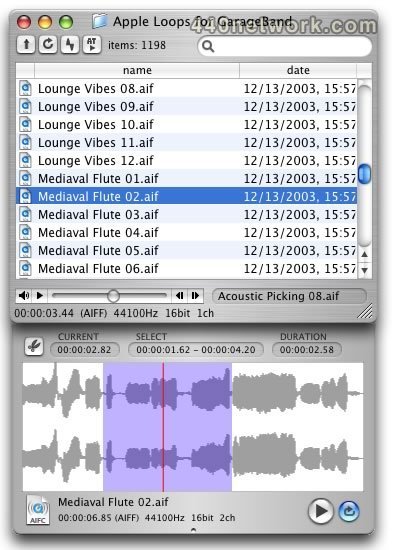
[Add] File information drawer. (fullpath, size, comment)
[Add] FileBrowser fullpah and comment column.
[Change] Waveform display sped up.
[Change] Suspend incremental search. (Due to the problem of slowing suddenly)
[Fix] Fixed sd2 file waveform display bug.
Only works on 10.4 Tiger or higher.
[Add] Spotlight search function.
[Change] AutoPreview button is changed.
[Fix] Fixed the problem that the playback might overlap when AutoPreview was used.

 MacOS X UB
 RapidPreview v 1.2
Dec 15, 2005
MacOS X PPC
RapidPreview v 1.2
Dec 15, 2005
MacOS X PPC


You must sign-in to post your comment:
You can signin with your 440Software account (MacMusic, PcMusic, 440TV, 440Forums, 440Software, ...) or via FaceBook, Twitter or Google.