beatbox
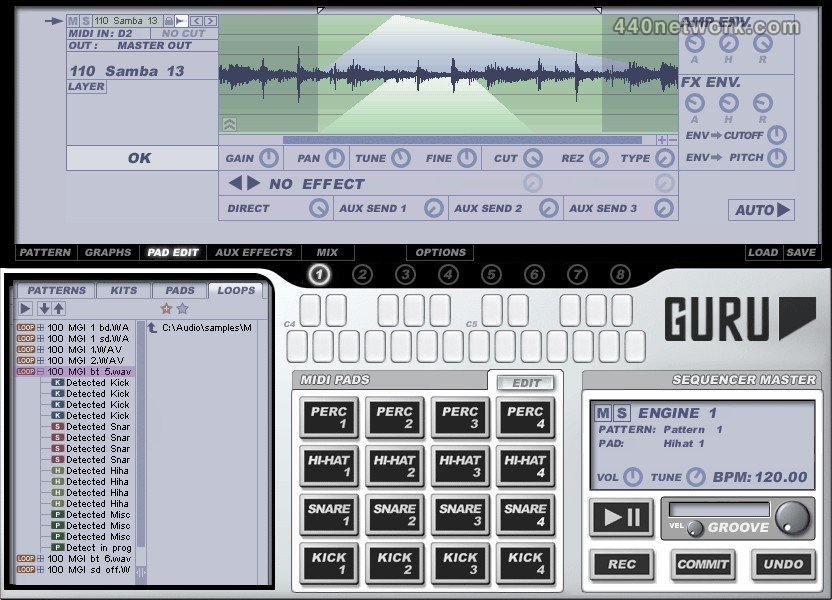
GURU's architecture is perfect for anything from straight-up breaks and stomping floor-fillers to complex polyrhythmic, multi-layered grooves. The powerful built-in FX and graphical parameter automation allow you to mutate your beats into new, unheard forms, or create subtle variations. Mash up your sounds with pitch modulation, repeat triggers, start-point and timing manipulation, resonant filters and much more. Everything from precision funk to disturbing sonic mangling and glitch beatscapes is at your fingertips.
Breathe new life into your loops with GURU's unique intelligent loop slicer, which categorizes slices as kick, snare, hihat or percussion hits, letting you use any audio material effortlessly and in the context of your pattern, or extract individual hits and the timing feel from loops. The extensive editing and processing tools then allow you to tweak samples and slice points, or layer more sounds.
GURU gives you back the hands-on feel which you crave... Record performances with the mouse or a MIDI controller, fire off sequences with a MIDI key, layer multiple engines, drop parts in and out and switch grooves on the fly. GURU is a complete sample workstation environment, ideally suited for live use or for intuitive composition in the studio.
FEATURES OVERVIEW :
• Advanced Step Sequencer - 128 steps, 16 channels, 24 memories per engine, full graphical automation, MIDI remote control, independent tempo multipliers, real-time and step recording with undo
• Automated sample slicing, classification and pad mapping (kick, snare, hat, percussion) with manual slice-tuning capability
Can load audio loops (WAV/AIFF/REX), MIDI loops, single-hits, complete kits, pattern banks..
• 8 Engines, each comprising:
- 16 MIDI-triggered Sample Pads
- Powerful step-sequencer with up to 128 steps
- 24 MIDI-triggered Patterns
- Three Aux effects units
- Master effects unit
• Intuitive mixer view offering a convenient overview of all 8 engines
Flexible groove/shuffle control for patterns – take the groove of one MIDI file and apply it in real-time to another
•Comprehensive Pad Editor offering individual control of the following for each pad:
- Gain, pan, coarse/fine tune
- Resonant filter blend between LP/BP/HP
- 3 Aux sends and an Insert effect slot
- Start/end point adjust
- Amp/FX envelope
- 8 velocity cross-fade layers
- Cut groups (choke groups)
• Includes library of over 2GB of professional sample content, featuring material by Yellow Tools, Wizoo, Gearshift and others.
• Eight stereo outputs, flexible routing.
• Built in midi mapping allows you to quickly setup GURU to work with your hardware groove box / drum triggers."
• Stand-alone application, ReWire device, and VST, DXi, AudioUnit, RTAS plug-in formats
 |
Version 1.6 |
MacOS X UB |
(App, AU, RTAS, VST) |
Apr 10, 2009 |
* Note repeat , note erase and fixed-level triggering for the pads
* Looping and phase flip per layer
* Patterns can now be up to 16 pages (512 steps) long (increased from 4 pages)
* 16 stereo outputs (increased from 8)
* Instant graph record from MIDI CC
* Skinning support
* various workflow and midi implementation enhancements (improvements to midi remote control, layer context menus etc.)
 |
Version 1.5 |
MacOS X UB |
(App) |
Sep 3, 2007 |
- New Audio Content
3 Gigabytes of new audio content covering hip hop, grime, rock, house, trance, experimental, breaks and more, from producers such as Goldbaby, Groove Criminals, Deadmau5, Bearded Lazies, Drummerheads and DJ Subject.
- Compatibility
100% compatible with the latest hardware & software platforms including Dual, Quad and 8-Core systems, Intel-based Macs, Windows Vista, Pro Tools 7.x, Digital Performer 5.x (including DAE mode).
- Audio Export
You can now render pads, tracks, engines or the full mix directly within GURU, and instantly export it via drag + drop to your host or OS, or give the rendered loop a second pass through GURU for further mangling. The audio exporter automatically tops and tails loops during rendering so they're ready to use straightaway in Live, Acid or other loop environment.
- Randomizer
A new creative inspiration factory, the randomize slider can operate on any of GURU's main screens – sequence, graphs, pad edit, effects, mixer – and allows you to apply a controllable amount of randomization to either the current pad or various combinations. Click on the randomize slider to generate a new set of 'seed' values, then drag to the left or right to apply them progressively to your patch. Hold down ALT or SHIFT while dragging the randomize slider to apply the process over a wider area – if you don't like what you hear, just hit the Undo button to the right.
- Sample editing – reverse, new layer modes, predelay
Samples can now be played backwards, and layers can be stacked in Random and Round Robin modes as well as the more conventional All Layers and Velocity Split. We've also added a Pre Delay per layer (in both milliseconds and musical units) allowing you to shift individual parts by a few ticks to get your groove 'in the pocket', or to create single-pad flams and ruffs out of individual samples.
- Slicer
We've given GURU's slicer a major overhaul – it is now much more accurate, and has a 'Sensitivity' control allowing you to adjust how it responds to possible hit points in your loops. In addition, its slicing and score extraction process is now velocity-aware - slices and scores are now generated in such a way that hit volumes are consistent when using the sounds from one loop with the score from another, or the score from a loop with a kit, or the slices from a loop with a pattern.
The Slicer can now be toggled between SINGLE mode, in which one slice is loaded per pad, and FULL mode, where up to 8 slices are loaded per pad, using the Layers. This allows Guru to fit long loops (up to 128 slices) in a single engine; it also supports a Linear Scoring mode where instead of smart-slicing by drum type, the slices are simply mapped to pads 1..16 in the order they occur in the loop file, much like a conventional slicer.
- Browser
The Browser is now significantly faster and can be driven entirely from the keyboard. We've made loads of little workflow enhancements like the PlusFX and PlusMIX controls, so you can now selectively preserve or overload your pad tweaks and mixer effects when loading loops or kits. Double clicking a browser tab now opens that tab as a folder in Finder/Explorer, and dragging an OS folder to the browser sets the current tab to that location.
In the Pads browser, we've also added a volume control for auto-preview, and support for multiple selection so you can drag multiple samples to the pads or layers in one go.
- Keyboard Support
GURU can now be driven largely without resorting to the mouse – the pads, patterns, browser, engines and transport all respond to the keyboard. Additionally, you can now mute, solo and un-mute individual engines at the touch of a button.
- Sequencer – improved sync, note duration / gate
The sequencer now locks to the host tighter than ever, and responds instantaneously to pattern change / gate messages allowing you to recombine and retrigger patterns at warp speed – perfect for drum and bass. GURU now supports note-duration across-the-board, allowing you to cut samples off before the full length plays.
There are new sequencer graphs for automating the Sample Reverse feature, and better support across-the-board for triplets, polyrhythms, and non-4/4 meters. Each pattern can be set to a different resolution - 8th, 16th, 32nd or 64th notes, as well as triplets.
- MIDI implementation
GURU's MIDI implementation has been greatly extended. As well as supporting realtime MIDI out (VST hosts only), GURU can now sync to MMC and MTC, and additional MIDI channels and controller messages have been added to give you full remote control over engine, pad and pattern selection, transport controls, and engine mute/unmute, as well as the effects section and the entire mixer.
- Miscellaneous
The audio engine is now drop-out-free, no more gaps or silences when previewing; we've added value readout tool tips across-the-board and improved the sample file management system a great deal. You can now hide the default "Kick", "Snare" etc. name assignments for the Pads; the name of the currently loaded song and kit or loop are displayed in the transport window. Finally, we've added a context menu to the Engine selectors allowing you to copy, paste, clear etc. entire Engines with just a couple of clicks – great for creating variations on a kit, for instance.