sound file conversion
BarbaBatch is a professional batch sound file conversion program.
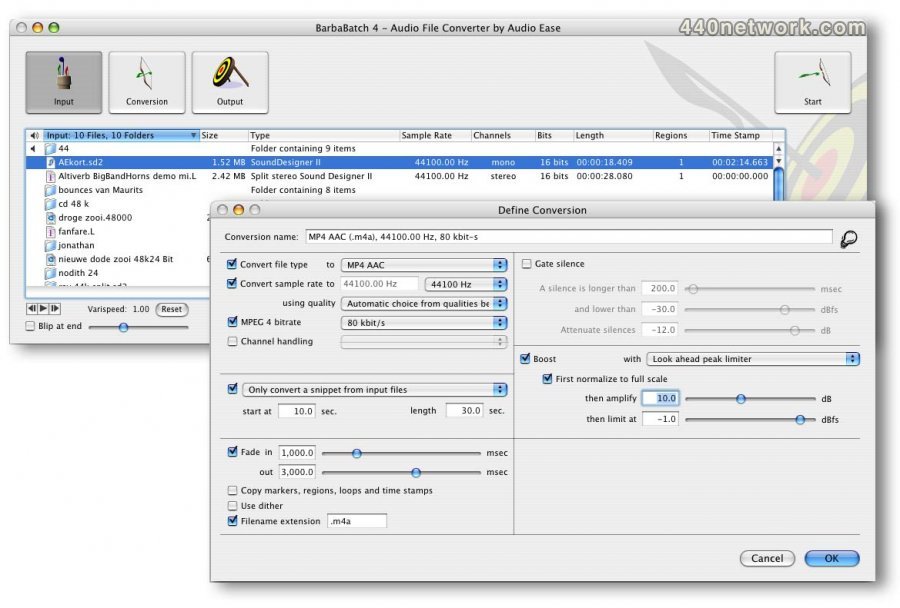
- For each file type you can set bit rate (kbits/sec) or number of bits per word up to 64 bits. Samplerates can range from 1000 Hz to 192 kHz.
- Channel processing is flexible : you can mix stereo to mono or vise versa, copy just single channels left or right, create interleaved stereo from split stereo files and vise versa.
- There is a normalizer that normalizes to a user set ceiling, but also a look-ahead gating algorithm with very intuitive controls, and a look-ahead peak limiter that makes your audio blast even through the smallest of speakers. The gate and peak limiters are built to straighten out speech, but are often used on musical material as well.
- Regions from Wave files, DDP IMAGE.DAT files, and Sonddesigner II files can be extracted to separate files
- You can set up the conversion so that it will convert for instance 20 seconds of audio from every input file, starting at second number 15, and creating a 1 second fade in and a 500 msec fade out.
- You can fade in and fade out all file types that can be input to BarbaBatch.
- BarbaBatch can preserve regions, loops markers and time stamps and sampler informations from input to output. It will recalculate Marker loop and region positions when regions are extracted or when samplerate is converted.
-
Many supported file types
 |
Version 4.0.59 |
MacOS X UB |
(App) |
May 9, 2012 |
Bug fix:
Sound Designer 1 files have a compatability problem with modern compilers. These files can still be read, but not written.
 |
Version 4.0.58 |
MacOS X UB |
(App) |
Feb 3, 2012 |
Bug fix:
Solved incompatibility with MacOS 10.4 and 10.5.
 |
Version 4.0.55 |
MacOS X UB |
(App) |
Mar 13, 2009 |
* 4.0.55
o Bug fix:
+ Wave 32-bit float files were interpreted wrong on PowerPC.
+ Broadcast Wave MPEG files had one wrong chunk header.
+ MP3 files could fail to embed ID3 tags.
* 4.0.54
o Bug fix:
+ Pro Tools generated AIFF files were interpreted wrong.
+ Using a non-SATA or IDE boot drive didn't authorizate properly.
* 4.0.53
o Bug fix:
+ QuickTime 7.5.7 (included in MacOS X 10.5.6) has a bug that prevents BarbaBatch from extracting audio data from files in its preferred manner.
* 4.0.52
o Feature:
+ BarbaBatch is now a Universal Binary, increasing performance on Intel Macs.
+ Added preference to recognize number files as split (.1/.2 etc). Default is off.
o Bug fix:
+ Importing QuickTime files and MP3, followed by sample rate conversion gave missing audio blocks in the output.
+ Output file names could carry double file type tag (i.e. .wav.mp3).
+ Added region support to AIFF files, as it is implemented in Pro Tools.
+ A conversion that only converted a snippet of the file didn't work for split stereo and split surround.
+ Reinstated split file name extensions (L)/(R) for old Logic archives.
+ Strictly enforce file name extensions. As OS X uses file name extension almost exclusively for type identification it hardly makes sense anymore to not add the proper extension for a specific type. A side effect of this is name ambiguity when the input folder containts, for instance, files calles "somefile.wav" and "somefile.mov" and both are converted to AIFF. As both outputs would be named "somefile.aif" a duplicate file name error is logged.
 |
Version 4.0.51 |
MacOS X PPC |
(App) |
Nov 2, 2008 |
Bug fix:
+ Normalize and gain sections could cause wrapping audio if end level was 0dB.
+ Naming conventions have changed a little: any file that has a fixed type extension will get that by default. The option in the conversion window to extend the file name only works for non-standard extensions.
+ Improved surround file support; there were a few omissions in the last release.
 |
Version 4.0.16 |
MacOS X PPC |
(App) |
Feb 15, 2005 |
MPEG I and II now have the option to switch frame padding on or off. This is to support older MPEG decoders, which don't handle wrong frame padding correctly.
 |
Version 4.0.15 |
MacOS X PPC |
(App) |
Feb 4, 2005 |
Bug fix:
Dawn files sometimes have bad size indicators. We ignore them and read the files anyway now.
 |
Version 4.0 |
MacOS X PPC |
(App) |
Jul 4, 2004 |
- Mac OS X support
- Resizable windows.
- Tables displaying Soundfile information in movable, resizable and sortable columns.
- Unlimited Undo/Redo on most actions.
- Multiple (and discontinuous) selections possible in all tables and lists.
- Log file can be viewed and printed from within BarbaBatch.
- Added support for the free LAME mp3 codec, which offers a good quality conversion.
- Added support for MPEG 4 AAC files on in and output
- Added support for Broadcast Wave (bwf) MPEG II files, including annotations and timestamps
- Added support for Broadcast Wave (bwf) Linear PCM files, including annotations and timestamps
- Added support for Sonic Solutions 32 bit files
- Added support for many filetypes mainly used in (Digital) telephony applications:
Wave a-law
Wave u-law
16 bit linear Dialogic vox files (extended with .p16)
PIKA
CCITT G.721 40 Kbps (4 bits ADPCM, 8 kHz)
CCITT G.723 16 Kbps (2 bits ADPCM, 8 kHz)
CCITT G.723 24 Kbps (3 bits ADPCM, 8 kHz)
CCITT G.723 40 Kbps (5 bits ADPCM, 8 kHz)
CCITT G.726 24 Kbps (3 bits ADPCM, 8 kHz)
CCITT G.726 32 Kbps (4 bits ADPCM, 8 kHz)
CCITT G.726 40 Kbps (5 bits ADPCM, 8 kHz)
- Added support for IMAGE.DAT redbook audio CD images on the input of Barbabatch. Barbabatch 4 can extract to separate tracks from such files.
- Added support for 32 bit floating point Wave (samplitude, sadie, nuendo mastering formats)
- Playback of 32 bit files.
- Playback of mp3 files.
- Playback of files up to 192 kHz.
- Reading and writing of Sonic solution timestamps
- Conversion of timestamps from input to output files in BWF (Broadcast Wave), SoundDesigner and Sonic Solutions filetypes.