 GarageBand v 6.0.2
Apr 1, 2011
MacOS X Intel
GarageBand v 6.0.2
Apr 1, 2011
MacOS X Intel
This update improves overall stability and addresses a number of minor issues, including the following:
* Support for opening projects imported from GarageBand for iPad.
GarageBand v 6.0.1
Jan 5, 2011
MacOS X Intel
This update improves overall stability, and addresses compatibility and a number of other minor issues.
Fixes an issue related to undoing Flex Time edits
Removes occasional latency that can occur on guitar tracks
Restores ability to use the Quantize Note Timing menu for tracks with Groove Matching
This update is recommended for all GarageBand '11 users.
GarageBand v 6.0
Oct 21, 2010
MacOS X Intel
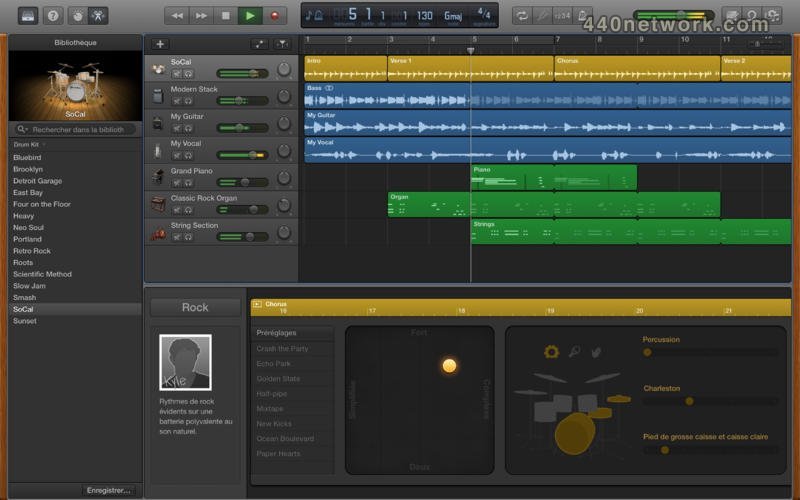
Flex Time and Groove Matching
Flex Time and Groove Matching are powerful tools that help you improve the rhythm and feel of your recordings. You can fix the timing of a note. Tighten the groove of your tracks. And easily create a great-sounding song.
New Guitar Amps and Stompbox Effects
GarageBand brings you seven new guitar amps for a total of 12. They're modeled after the most revered gear in the world — from clean sounds to heavy distortion and everything in between. You can also reproduce the sound of classic foot pedals with five new stompbox effects, making 15 to choose from. Mix amps with stompboxes and find thousands of ways to rock. And with the Apogee GiO (sold separately), you can control GarageBand hands-free, so you don't ever have to stop playing. The GiO lets you control stompbox effects, recording, and transport controls with your feet. Plug an electric guitar into your Mac, crank it up, and let it rip.
"How Did I Play?"
First GarageBand taught you how to play. Now it tests your chops. As you play along with any lesson, record yourself. GarageBand listens in real time and tells you how you're doing. You'll see how well you played with colored notes, a progress bar, and a performance meter. You can check your rhythm and note accuracy, keep track of your progress, and beat your best score — all while perfecting your skills.
New Lessons for Piano and Guitar
With 22 new genre-based lessons (40 in all), you can pick up the basics of piano, guitar, or even both. Video demonstrations, synchronized notation, and instrument animations make lessons fun and easy to follow. And you can learn at your own pace. You'll jam with the Blues Guitar and Rock Guitar series. You'll master classical piano pieces by Bach, Beethoven, Mozart, or Chopin. And you'll play Top 40-style piano with the Pop Piano series. The new built-in glossary is a great reference for tuning your guitar, changing strings, reading music, finding basic chords and scales, and more. With the Chord Trainer, you'll master the most important guitar chords by shape, which makes it easier to keep them straight.
 GarageBand v 5.1
Aug 7, 2009
MacOS X UB
GarageBand v 5.1
Aug 7, 2009
MacOS X UB
This update addresses general compatibility issues, improves overall stability, and fixes a number of other minor issues. The issues addressed include:
GarageBand track effects and Audio Units can now be added to a guitar track
Improved support for Apogee audio interfaces
Faster switching to full screen in Magic GarageBand
Improved access to audio monitoring settings
GarageBand v 5.0.2
Jun 2, 2009
MacOS X UB
This update addresses general compatibility issues, improves overall stability, and fixes a number of other minor issues.
GarageBand v 5.0.1
Feb 4, 2009
MacOS X UB
This update improves overall stability and addresses specific issues with downloading lessons from the Learn to Play Lesson Store. It is recommended for all GarageBand 09 users.
GarageBand v 5.0.0
Jan 18, 2009
MacOS X UB
Basic Lessons
GarageBand '09 introduces Basic Lessons: the easiest way to learn piano and guitar, right on your Mac. Follow along at your own pace with interactive lessons that teach you the fundamentals through HD video instruction, synchronized notation, and animated onscreen instruments.
Play your way through a series of nine piano or guitar lessons that get you ready to play an entire song. Learn by repetition. Slow things down or repeat any part to get it right. Basic Lessons give you complete control over how you learn. And when you're more comfortable, you can practice your new skills with a complete backing band.
Artist Lessons
Sure, music video games are fun. But nothing is more authentic than learning to play a real song on a real instrument. And who better to teach you that song than the artist who made it famous? Introducing Artist Lessons in GarageBand '09 (sold separately). Have Sting teach you how to play "Roxanne," Colbie Caillat teach you how to play "Bubbly," Fall Out Boy teach you how to play "I Don't Care," and many more. Browse, preview, and purchase Artist Lessons from the Lesson Store inside GarageBand. Then get step-by-step instructions for chords, finger positions, and techniques from the people who know your favorite songs best.
Play along with your artist/instructor or take your skills to the next level and jam with the original band. You can even select and listen to individual instruments from multitrack recordings available only on GarageBand. Want to hear what Sting's guitar sounds like on its own? Think you're ready to sit in for Colbie Caillat? Artist Lessons let you control the mix and instrumentation, so you can hear or play whatever you want — even slow things down to make learning easier.
Artist Lessons also give you something you won't find anywhere else: the story behind the song. Sit back and listen to each artist tell you how the song was written and what inspired it. The Artist Lessons library keeps growing, so you'll always have songs to learn (and learn about).
New Guitar Features
GarageBand '09 puts rock history on display with new amps and stompbox effects that re-create the sound of legendary guitar rigs — right on your Mac. Just plug in an electric guitar and play through five new amps modeled after the most revered in the world. Choose from over 30 complete rigs, including Brit Pop, Honky Tonk, Lowdown Blues, Seattle Sound, Stadium Solo, and Woodstock Fuzz. Add virtual stompboxes that reproduce classic foot pedals, including Fuzz Machine, Blue Echo, and Auto-Funk. Then get a 3D view of your rig — complete with amp, speaker cabinet, and stompboxes.
Magic GarageBand Jam
When it's time to focus on jamming, turn your Mac into a full-screen stage with Magic GarageBand Jam. Assign instruments and styles to your guitarist, bassist, drummer, and keyboard player. Shuffle instruments randomly to instantly hear a new sound from your backing band. Create a custom mix using volume sliders or by muting and soloing any instrument. Quickly navigate to any part of the song using the new Arrangement Track, or just repeat your favorite part. When you're happy with rehearsals, you can record right into Magic GarageBand.
GarageBand v 4.1.2
Mar 4, 2008
MacOS X UB
This update improves overall stability and addresses issues with the automation of software instrument parameters, FireWire and USB based audio devices and Magic GarageBand.
GarageBand v 4.1.1
Dec 14, 2007
MacOS X UB
This update improves overall stability and addresses issues with file export to iPhone.
GarageBand v 3.0
Jan 10, 2006
MacOS X UB
Easily create podcasts in the new Podcast Studio mode and publish them with iWeb.
Add radio-style sound effects and jingles to your recordings and podcasts.
Sound like a professional radio host with the built-in expertise of an audio engineer.
Create a talk show podcast and interview one or more remote guests simultaneously via iChat.
Create a music score for your iMovie even if you're not a musician.
 GarageBand v 2.0.1
Apr 26, 2005
MacOS X PPC
GarageBand v 2.0.1
Apr 26, 2005
MacOS X PPC
GarageBand 2.0.1 addresses issues with duplicating tracks, playhead snapping to grid, joining software instrument regions on adjacent tracks, making precise adjustments to volume and pan settings, and converting Software Instrument Apple Loops based on drum sounds into Real Instrument Apple Loops. It also addresses an issue where recorded Real Instrument regions may not properly adjust to changes in the project key.
GarageBand v 2.0
Jan 11, 2005
MacOS X PPC
multi-track recording (up to 8 audio tracks at once);
built-in real-time music notation;
new enhanced timing and tuning options;
instrument tuning;
and support for more musical formats.
GarageBand v 1.1
Oct 21, 2004
MacOS X PPC
GarageBand 1.1 addresses isolated performance and stability issues, allows per-track Echo settings similar to other effects, supports loop libraries in other disk locations, supports importing unprotected AAC audio files in addition to AIF and MP3 files, and addresses issues with ReWire support, moving GarageBand songs between different computers, Help support, fixing the timing of individual notes (as well as entire regions), and dragging entire tracks in the timeline. .
less...




You must sign-in to post your comment:
You can signin with your 440Software account (MacMusic, PcMusic, 440TV, 440Forums, 440Software, ...) or via FaceBook, Twitter or Google.