 Kontakt v 5.6.8
Jun 3, 2017
MacOS X Intel
Kontakt v 5.6.8
Jun 3, 2017
MacOS X Intel
ADDED New KSP built-in variable ($NI_CONTROL_PAR_IDX) returns the index of the element triggering a UI callback; applies to tables and the XY Pad
CHANGED Add & Activate Library buttons now launch Native Access which now also supports 3rd party Libraries
FIXED The frame rate would drop significantly if multiple waveform displays were used on a KSP UI
FIXED The Missing Samples dialog would always suggest the default user folder instead of the folder the NKIs are in
FIXED Crash when switching to Mini View under circumstances
FIXED Using get_control_par() with $CONTROL_PAR_ALLOW_AUTOMATION now returns the correct value instead of always 0
FIXED Certain Bank properties would be discarded when re-saving NKSNs
KNOWN ISSUE The documentation is not up to date
Kontakt v 5.6.6
Feb 26, 2017
MacOS X Intel
The update includes the following improvements and fixes:
Improved the On-Screen Keyboard’s color legibility based on user feedback
XY Pad: Individual cursors can now be hidden via KSP ($HIDE_PART_CURSOR)
The customized string representation of parameter values in XY Pad is now shared with the host correctly
Updating the value of a cursor from within the control’s callback is now reliable in XY Pad.
No longer any potential crashes when trying to view the Host Automation tab with certain NKIs loaded
Crash when trying to view the Infos (sic) tab of the Instrument Options dialog with certain NKIs now fixed
Certain NKIs no longer trigger the “Really quit…” dialog every time they were closed
Kontakt v 5.6.1
Oct 13, 2016
MacOS X Intel
CHANGED Improved text legibility on many UI areas based on user feedback
FIXED Voices were not killed correctly in certain cases, resulting in unnecessary load
FIXED Crash on loading certain instruments
FIXED “Compress samples” check-box when saving NKIs was ignored on Windows
FIXED Switching to Mini-view and back would reset the window size
FIXED Issues when instrument size was set by multiple script slots
FIXED Crashes related to using special character in various text fields
Kontakt v 5.6.0
Sep 15, 2016
MacOS X Intel
CHANGED The user interface style has received a major update
ADDED Real numbers and advanced math functions are now available in KSP
ADDED New KSP command to enable instruments up to 1000 pixels wide: set_ui_width_px()
€” CHANGED The maximum height of instruments was raised to 750 pixels when set via KSP
ADDED Official support for automation assignments via KSP, improving a previously undocumented, yet widely used feature
ADDED Parameter names are now visible in ProTools’ Plug-in Automation list
ADDED Usage data tracking. More info here: https://www.native-instruments.com/en/support/knowledge-base/show/4519/what-is-usage-data-tracking/
ADDED New KSP command to set an instrument’s color including its header: set_ui_color()
CHANGED Improved performance on certain scripts using heavy image resources
FIXED The Transient Master effect stopped processing when there were no voices running, abruptly muting tails of other effects
FIXED The Phaser effect produced stereo signal with muted right channel when used with mono samples
FIXED Common loading time issue with commercial Libraries that was worked around by local batch re-save
FIXED Sample-rate changes would cause crackles and changes of the sound of the convolution effect
FIXED NKA files would silently fail being written to disk under certain circumstances (affected certain Libraries, like EXHALE)
FIXED Modal dialog placement was unpredictable - now everything appears on center of active display
FIXED Crash when showing the Quickload panel while having high UI activity on a Performance View
FIXED Crash on OS X when changing the latency setting right after changing the sample rate
FIXED Crash when renaming modulators under certain circumstances
FIXED Deleting MIDI CC modulators only worked on one group even when attempting it over multiple ones
FIXED Editing modulators of modulators only worked on on one group even when attempting it over multiple ones
FIXED Attempting to rename modulators across multiple groups yielded unexpected results
FIXED The memory footprint display on instrument header froze when in MASCHINE or KOMPLETE KONTROL
FIXED The UI of the mod shaper turned unusable when deleting the first or last node
FIXED Drag and drop was broken on OS X if a CD was in the drive
FIXED Changing snapshots on bigger instruments caused a parse error under certain circumstances
FIXED KSP: Parameter value strings (labels) wouldn’t be published to DAW if triggered from within the ui_control callback of textedit controls
FIXED KSP variable $EVENT_PAR_SOURCE was unreliable under certain circumstances
FIXED The Retrigger factory script would freeze notes when rate-knob was set to bar and clock was not running
REMOVED The Modules tab from the sidebar has been removed
REMOVED The font size option has been removed
KNOWN ISSUE The database will be empty after updating to 5.6; a manual “Reset and Rescan” is required
KNOWN ISSUE All French, German, Japanese and Spanish documentation is out of date
KNOWN ISSUE The Getting Started documents are out of date
Kontakt v 5.5
May 6, 2015
MacOS X Intel
FEATURES:
Extended KSP format plus additional parameters for the KONTAKT engine, for optimised engine use with new instruments.
Control Time Machine Pro voice settings from KSP
Change the contents of FX Slots from KSP
Control time-related effect parameters (Delay, Chorus, Flanger, Phaser) via KSP
Time-related parameter handling
User interaction options for time-related effect parameters are improved, and behaviour is more consistent
Improved performance
No more CPU spikes during KONTAKT instrument playback when manipulating the host tempo
Improved performance for processing MIDI CC events
FIXES:
Fixed parse errors in Sonar Platinum
Automatable parameters are now updating correctly on Komplete Kontrol and Maschine hardware
Fixed CPU spike when changing tempo
Fixed crash with corrupted database
Fixed automatable parameters not being saved with a project
Fixed CPU spike when changing EQ Gains
Various other minor fixes
Kontakt v 5.4.3
Jan 21, 2015
MacOS X Intel
Fixed a crash with the "Roland Quad Capture" audio interface.
Improved updating parameter values in KOMPLETE KONTROL and MASCHINE.
Fixed a crash when saving, while automation was assigned to theLFO phase parameter.
Kontakt v 5.4.2
Nov 28, 2014
MacOS X Intel
What's New:
In some scenarios Sample Modelling’s "The Trumpet” was detuned by a a few cents on Mac OS.
Activation issue on specific high-end machines resolved.
Fixed batch-resave issue which removed mappings from instruments in rare cases.
Issue with only two folders being displayed if snapshots were in subfolders fixed.
Key switches now always displayed on the virtual keyboard after project recall.
Background loading display on the snapshot tab fixed.
Quickly opening and closing the GUI with various DAWs no longer crashes.
Rise and Hit and Logic Pro crashing issue fixed.
Fixed a crash with the feedback compressor in the output section.
Updated KSP reference Manual.
Kontakt v 5.4.1
Sep 22, 2014
MacOS X Intel
What's new:
Advanced integration with KOMPLETE KONTROL added
Snapshot system for NKIs added
Added load_array mode 2, .nka files can now be stored in the resource container
CPU performance in certain scenarios further optimized
Miscellaneous other fixes
Please note RTAS is no longer supported with this update.
Kontakt v 5.3.0
Oct 24, 2013
MacOS X Intel
What's New in 5.3.0?
Added support for Avid Audio eXtension (AAX Native 64 bit)
Advanced integration in MASCHINE 2.0 host software
New 'Simple LP/HP' Filter
New 'Easy Mode' for DBD Envelope
Most important bug fixes in 5.3.0:
Fixed: crash when using Batch Resave under certain circumstances
Fixed: different other crashes
Kontakt v 5.2.1
Aug 9, 2013
MacOS X Intel
Fixed crash with Output FX presets
Fixed issue with KONTAKT Script Processor instruction set for MIDI Object handling
Kontakt v 5.2.0
Jun 30, 2013
MacOS X Intel
New effect: Feedback Compressor
Improved KONTAKT Script Processor instruction set for MIDI Object handling
Fixed rare crash when streaming .ncw files
Other minor fixes
Kontakt v 5.1
Dec 19, 2012
MacOS X Intel
This update provides the following new features, fixes and improvements:
Added support for Avid Audio eXtension (AAX Native 32-bit)
New ‘Jump’ Amplifier effect from GUITAR RIG added to the range of KONTAKT effects
Plug-in migration for Mac OS X Audio Units – KONTAKT automatically updates to newest version on projects created with older versions of the software
Mac OS X 10.8 RTAS: Fixed crash on startup
Kontakt v 5.0.3
Jul 1, 2012
MacOS X Intel
What's New in 5.0.3?
Mac OS X AudioUnit: Plug-In Migration
Most important bug fixes in 5.0.3:
Mac OS X 32 bit: fixed rare crash on startup
Improved loading times of Instruments with many Groups using TMPro
Resource Containers for Kontakt Libraries now support .ncw files
Fixed crash when reloading purged samples in a Group using TMPro
Fixed crash when importing a Group with missing samples
Fixed other rare crashes
Kontakt v 5.0.2
Jan 18, 2012
MacOS X Intel
New and improved features:
Significant Time Machine Pro improvements- wider ranges for speed and tune; new 'keep formants' mode when 'HQ' is activated
Improved file import
Easier and faster activation for KONTAKT Instruments
Dynamically resizable 'post-amp' section in Group Effect Chain
Invert and Channel Swap functionality in Group amplifier section
Other small fixes and improvements
Kontakt v 5.0.1
Oct 7, 2011
MacOS X Intel
New and improved features:
Mac OS X Lion compatibility
Fixes:
Various crashes fixed
Activation problems with certain Kontakt libraries fixed
Audio issues at zero volume setting in Instrument Bus system fixed
Modulation behaviour of Solid G-EQ fixed
Pitch knob scaling for Time Machine Pro fixed
Library sorting issues fixed
Tempo issues with certain REX2 files fixed
Audio issues when setting send levels via KSP fixed
Delay output issues with instrument loaded into bank fixed
Other minor fixes
__________________
Kontakt v 5.0
Aug 1, 2011
MacOS X Intel
NEW PRO EFFECTS
SOLID G-EQ*
An authentic re-interpretation of a classic studio effect— a uniquely clean and musical 4-band EQ switchable to shelf on the low and high bands, plus two full parametric mid-bands.
SOLID BUS COMP*
Also available as a fully-fledged product in its own right, this virtual reproduction of a legendary compressor adds presence and drive without blurring the detail. Though traditionally used to "glue a mix together", it's not just for bus compression!
TRANSIENT MASTER*
Another premium-grade effect, also available separately — TRANSIENT MASTER is an incredibly musical and versatile tool for re-shaping any kind of percussive sound. Make a sound hit harder, or shorten the resonance tail of a sound that rings too long. Bring instruments to the front of the mix or smooth out spikiness.
TAPE SATURATOR
By simulating the natural, harmonic compression of analog tape, the TAPE SATURATOR adds a pleasing warmth to your sound. And pushed a little harder, it delivers a smooth, organic overdrive.
* These pro-league effects are also available as fully fledged individual products - but you have them already included here in KONTAKT 5.
37 NEW FILTERS
KONTAKT 5 enhances your creative sound design palette with 37 new, high-quality filters, developed by the creative mastermind behind MASSIVE. The range covers the whole spectrum from classic state variable low-pass filters to avant-garde formant filters, and nine of the new additions employ groundbreaking adaptive resonance technology. These 'AR' filters manage resonance peaks automatically — like an intelligent limiter inside the instrument — to avoid sudden harshness, unpleasant volume bursts, and unwanted distortion.
VINTAGE SAMPLING MODES
KONTAKT 5 offers vintage sample modes, straight from the MPC school of beatmaking. These re-create the unique sound and feel of the MPC60 and the SP1200, and are authentic enough to bring a nostalgic tear to the eyes of veteran beatheads everywhere. The algorithms used come from MASCHINE.
ADVANCED TIME-STRETCHING
An important addition in KONTAKT 5 is the new Time Machine Pro algorithm, providing super-high-quality time-stretching — particularly suited to melodic and tonal material. Use Time Machine Pro for complete audio fidelity and imperceptible tempo-changes with all harmonic content intact.
FEATURES FOR BUILDERS
16 CHANNEL BUS SYSTEM
The new 16- bus system introduces comprehensive routing options with integrated insert and send effects. This is a powerful tool for creating detailed effects chains within an instrument. For example, when building a drum kit, you might want to use completely different effects on the kick, toms and snare, while still sending the whole kit to a stereo master channel. Now you can.
MIDI FILE SUPPORT
KONTAKT 5 provides a new feature in the Kontakt Script Processor: the MIDI file player. Useful for creating instruments that can play patterns, loops and grooves as opposed to single notes. As used in STUDIO DRUMMER's groove library, which provides over 3,500 exclusive beats and fills as production-ready MIDI patterns.
RETRO MACHINES MK2 INCLUDED
Customers who buy KONTAKT 5, or update / cross-grade to KONTAKT 5, are eligible for a free copy of RETRO MACHINES MK 2. You'll receive this collection of 16 definitive analog synthesizers and keyboards once you have registered KONTAKT 5 - we'll send you a download link for your free copy.
Kontakt v 4.2.3
May 13, 2011
MacOS X Intel
New and improved features:
* Vintage Organs compatibility restored
* Freeze with group imports fixed
* Looping issues with groups and Time Machine 2 fixed
* Latency compensation issues fixed
* Batch resave issues fixed
* Crash with accumulating voices in Tonehammer Emotional Piano fixed
* Other minor fixes
Kontakt v 4.2.2
Feb 22, 2011
MacOS X Intel
New and improved features:
* New binary file format for increased saving/loading performance
* New zero-latency convolution engine with optimized performance
* Revised master output section with presets and advanced macro functions
* Additional import formats
(Akai MPC 5000, Alesis Fusion, Drumagog, Korg Triton, Roland Fantom, Yamaha Motif)
* Numerical parameter value input via keyboard
* VST plugin operation under Mac OS X 64bit
* Rex import under Mac OS X 64bit
* Startup and shutdown time in plugin mode improved
Fixes:
* Performance issues with mono samples in HQI interpolation mode fixed
Kontakt v 4.1.3
Oct 26, 2010
MacOS X Intel
* KSP Fade Out timing issue fixed
* MIDI-Export-to-Host issues fixed
* Crash when using Kontakt Memory Server in Manual Mode in Logic 9.1.2 fixed
Kontakt v 4.1.1
Aug 9, 2010
MacOS X Intel
* Note-on click during filter cutoff modulation fixed
* Automation ID issue with instrument prev/next button fixed
* 'Restore loops from samples' functionality fixed
Kontakt v 4.1
Jun 2, 2010
MacOS X Intel
New and improved features:
Intelligent background sample loading
Extended sample search and replacement functions
Improved database browser performance
New "Lock" function for QuickLoad browser
New "Mirror Folder Structure" mode for batch compression
Mac OS X 64bit AudioUnit version
New Help menu in all plugin versions
Fixes:
Playback issues in Sonar and other hosts with 48 kHz or higher samplerate fixed
Crackles when playing libraries in .ncw format on CPUs without SSE2 fixed
Crash when importing EXS files saved with Logic 9.x fixed
Occasional MemoryServer freezes on Mac OS X fixed
Various other fixes
Kontakt v 4.0.5
Feb 10, 2010
MacOS X Intel
Beatmachine now follows master tempo without having to retrigger loop; speed knob works correctly
Fixed incorrect displayed values of performance view GUI elements after recall in some cases
Fixed some rare crashes
 Kontakt v 4.0.2
Oct 16, 2009
MacOS X UB
Kontakt v 4.0.2
Oct 16, 2009
MacOS X UB
Fixes:
* Crashes on session recall with multiple instances on Mac fixed
* Activation issues with Kontakt libraries on Windows Vista fixed
* Improved key focus as plugin
Kontakt v 4.0
Oct 2, 2009
MacOS X UB
New Authentic Expression Technology (AET)
The new Authentic Expression Technology sees KONTAKT 4 radically redefining the authentic reproduction of acoustic instruments with all their dynamics and articulations, while adding completely new options for creative sound design. In addition to the traditional way of sampling different volume levels of an instrument statically, AET is able to capture specific spectral characteristics of samples and gradually apply them to another samples in real-time, allowing you to seamlessly "morph" between different instruments' characteristics. This breakthrough allows for a new level in expression and realism when playing a sampled instrument.
AET is especially powerful applied to solo instruments with sustained sounds - such as strings, brass, woodwinds, and choir: You can hold down a key and then seamlessly fade with the Mod Wheel between different articulations (e.g. trumpet playing with and without mute) or volume/dynamic levels with different harmonics.
It's often possible to merge the acoustic characteristics of different instrument such as the piano and celesta in real time, opening new horizons for creative sampling and new kinds of hybrid instruments.
Expanded sound library: + 10 GB
In addition to the six collections available in the previous version, KONTAKT 4 now includes a comprehensive Choir Collection, recorded exclusively for Native Instruments, providing a complete set of soprano, alto, tenor and bass voices in different setups.
Several instruments of the Choir Collection makes use of the new Authentic Expression Technology giving you a new level of control: the choir voices can seamlessly morph the vowels ("A-E-I-O-U") while holding a key/note, which is nearly impossible with other samplers.
In addition, the Orchestral Collection has been updated with a new Solo Strings section, taken form the legendary Vienna Symphonic Library, and a concert hall organ, while the Vintage collection gets the famed Mellotron keyboard. Plus, all the e-pianos from ELEKTRIK PIANO are included.
All in all, an extra 10 Gigabytes of new material enrich the KONTAKT library.
Expanded Convolution Effect Library
KONTAKT 4 comes with more than 300 new and professionally recorded impulse responses from a wide rang of rooms, concert halls, churches, speakers etc, to add super-realistic reverbs to your instruments or the sonic characteristics of high-quality hardware equipment (amps, speakers, hardware reverbs etc.).
The new impluse response samples are provided by Echochamber, Studiodevices and Acousticas.
Improved Performance Views per instrument
PERFORMANCE VIEWS provide custom control panels, that make Instrument-specific settings available without having to switch to Edit mode. In KONTAKT 4, a much larger control panel is available so each instrument has more important parameters accessible, as well as giving each instrument a distinctive feel through the easy-on-the-eye graphics.
Advanced Script Processor
The enhanced KONTAKT Script Processor gives many more options for designing custom Performance Views and for controlling other KONTAKT areas such as the master section (when writing 'multi scripts').
New attribute-based browser and pre-tagged library
It's never been easier to find the right sound or instrument. With the attribute-based browser you can search via keywords or browse by instrument type (bass, piano, strings).
The complete KONTAKT 4 library has been pre-tagged for your convenience. You can also create custom attributes to tag your instruments according to your own criteria.
Attribute-based browsing works for Instruments, Multis, Banks, Groups, Presets, and Samples.
Lossless Sample Compression
New Lossless Sample Compression format 'NCW' with real-time encoding – reducing the size of samples by up to 50%. Instruments with high disk streaming load, such as Grand Pianos, benefit from the fact that less data has to be read from hard disk. Note that the complete KONTAKT library is delivered in uncompressed WAV format - the Lossless Sample Compression is just an option for your choice when you save instruments.
Various Improvements
Last but not least, KONTAKT 4 includes all the powerful improvements from the comprehensive KONTAKT 3.5 update
Kontakt v 3.5
Jul 17, 2009
MacOS X UB
Extended Memory Addressing
KONTAKT 3.5 features full support for 64-bit memory addressing in both Windows and Mac OS X. This means you can load more than 4 GB samples into RAM in both stand-alone and plug-in mode. In Windows, 64-bit operating systems and sequencers with special stand-alone and VST versions are now supported. On Mac, the newly-created Memory Server feature bypasses the OS X's 4 GB limit and can address as much RAM as you have installed - even in 32-bit hosts such as Logic or ProTools.
Enhanced Sampling Engine
KONTAKT 3.5 features a completely re-designed sample playback engine. The Direct From Disk mode has been reworked to act dynamically, allowing the operating system to allocate memory in real time as you play and release voices. The result is a significantly smaller memory footprint which leaves more RAM for loading samples. This is especially useful with 32-bit systems where you can now load significantly more samples than was previously possible.
Multi-processor support
KONTAKT 3.5 now provides true multi-processor / multi-core support. You can now switch multi-processor support on and off and set the number of processors / cores you want to use for KONTAKT. Up to 16 cores are now supported.
Direct MIDI Learn
KONTAKT 3.5 now features MIDI Learn function for all sliders and knobs including Performance Views. Assigning MIDI controllers to KONTAKT sliders and knobs is quick and convenient with multiple assignments also possible.
Enhanced Library Management
KONTAKT 3.5 integrates a visually enhanced library tab that now makes browsing and loading samples and libraries quicker and easier.
Various Improvements
Further improvements in KONTAKT 3.5 include a bypass button for effect slots, localized info pane in six languages, improved automapping, Pro Tools compatibility under Mac OS X 10.5 Leopard, aftertouch interpretation added to KSP, a Play cursor for Beat Machine mode in Wave Editor and enhanced REX file support.
Kontakt v 2.2.4
Dec 25, 2007
MacOS X UB
New and improved features:
Mac OS X 10.5 "Leopard" compatibility
Fixes:
RTAS multi outputs fixed
"Crash on startup" issues fixed
Kontakt v 3.0.1
Nov 1, 2007
MacOS X UB
Improvements:
New CPU Profiling mode for analyzing CPU usage of an instrument
Performance improvements for Edit mode
Performance improvements for distortion, saturation and synth filters
Faster database search
Additional patches
New Kontakt 3 Library Manual
Kontakt Script Language Manual now includes 2.1 appendix
Localized versions of Kontakt 3 Manual and Setup Guide
Fixes:
Various cosmetic improvements
Crash with Cubase 4 and Spectrasonics fixed
Various library fixes
Various bug fixes
Kontakt v 3.0
Oct 4, 2007
MacOS X UB
New Library with 33 GB and 1000 instrument presets
Interface improvements and simplifications
Expanded Multi Function Browser and KONTAKT navigator
New Effects: skreamer, rotator, twang amplifier emulation, eleven cabinet emulations
New Wave Editor with sample editor and zone envelopes
Expanded Mapping editor
Expanded modulation systems
Other extras (new keyboard shortcuts...)
Kontakt v 2.2.3
Jul 28, 2007
MacOS X UB
Format Change: Instruments, Multis, Banks saved in this version are not compatible to previous versions of Kontakt.
License Server compatibility.
Script knob automation: you can now automate script knobs just like any other knobs in Kontakt. Just drag and drop an automation ID from the browser's Automation tab onto a knob in your script. You can use a maximum of 16 automation IDs per script.
You can now send data from MIDI input and scripts to the MIDI output. Please check out the extended settings under "Send MIDI to outside world" in the Options dialog, Audio Engine tab.
New option on Load/Import tab: "Always re-write samples as WAV when Saving". This option allows to save every sample in WAV format e.g. when a patch was created from a REX file. When you save as a monolith, samples will always be converted to WAV. Please ignore the older option below: "Destination Sample Format".
New import formats: ASR-X and Emax II.
Several important bugs have been fixed.
Kontakt v 2.2.1
Mar 9, 2007
MacOS X UB
Format Change: Instruments, Multis, Banks saved in this version are not compatible to previous versions of Kontakt.
License Server compatibility.
Script knob automation: you can now automate script knobs just like any other knobs in Kontakt. Just drag and drop an automation ID from the browser's Automation tab onto a knob in your script. You can use a maximum of 16 automation IDs per script.
You can now send data from MIDI input and scripts to the MIDI output. Please check out the extended settings under "Send MIDI to outside world" in the Options dialog, Audio Engine tab.
New option on Load/Import tab: "Always re-write samples as WAV when Saving". This option allows to save every sample in WAV format e.g. when a patch was created from a REX file. When you save as a monolith, samples will always be converted to WAV. Please ignore the older option below: "Destination Sample Format".
New import formats: ASR-X and Emax II.
Several important bugs have been fixed.
Kontakt v 2.2
Mar 7, 2007
MacOS X UB
Universal Binary
Enhanced sliced loop handling with drag-and-drop, in-sync preview and more
Import function now also reads Battery 3 kits/cells as well as DR-008, Pulsar STS and RGC SFZ
Improved group management with load/save function, 128-voice groups, and new group presets
New modulation, tuning and envelope functions
Extended KSP engine with five new commands
...
 Kontakt v 2.1.1
Jun 3, 2006
MacOS X PPC
Kontakt v 2.1.1
Jun 3, 2006
MacOS X PPC
* Instruments reordering in rack
* Multisample import into one instrument
* New Send MIDI to Outside World option
* New piano banks
* KSP: Change_vol function support for while loops
* KSP: Display engine values and units in GUI
* 41 Bug fixes, the most important being
Memory corruption crash
Mono output in some VST hosts
Mac: Eject button not working
Mac: Monolith saving crash
PC: Tone machine not analyzing new samples
Bank quickload not working
Bank max voices crash
Delete instruments crash
Browser hangs with certain samples
Many more import bug fixes
Kontakt v 2.1
May 1, 2006
MacOS X PPC
Performance Enhancements
Shorter Loading Times: Loading times are now much faster, especially when using several banks with many instruments
Less Memory Usage: RAM usage has been reduced for internal objects (everything but samples)
Lower Processor Load: CPU load has been dramatically reduced in idle mode, especially when using several banks with many instruments
Better Multi-Processor Support: Multi-processor support has been enhanced with better load balancing for group voices and insert effects and additional load balancing for instrument insert and send effects when using several instruments.
Usability Enhancements
New sample Search: The sample search function has been greatly improved. It is now much easier to find missing samples. There are several ways to look for the files and Spotlight, on Mac OS X, has also been integrated, which helps to find files much faster.
Batch re-save: If you have renamed or moved files or folders and subsequently lost the sample references of your KONTAKT instruments or multis, the batch re-save function helps restore your file references. Simply select a folder with the batch re-save and all instruments in this folder will automatically re-assign all samples to the instruments and re-save each instrument.
Compatibility
BANDSTAND, AKOUSTIK PIANO, KONTAKT PLAYER 2:
KONTAKT 2.1 is now fully compatible to BANDSTAND, AKOUSTIK PIANO and KONTAKT PLAYER 2. The instruments of these products can be loaded, used, and edited in KONTAKT and are fully compatible with their original versions. After editing instruments, these can even be re-used in BANDSTAND or AKOUSTIK PIANO again.
Plug-in compatibility - RTAS:
KONTAKT 2.1 is now compatible to ProTools 6.9 and 7 (7.0 and 7.1) with enhanced performance. For the best performance results, it is recommended to use the latest version of ProTools.
Import formats:
With SampleCell and BeatCreator, a further two formats have been added to the list of import formats. Kurzweil, Gigastudio 3 and Ensoniq formats were added with version 2.0.1.
Performance and Minimized View
Performance View
Every instrument can now have its own, individual and customizable graphic background (skin). You can also add your own top-level parameter control with the KSP Script engine and bring it to the front.
This allows the most important control elements to be accessed without having to go into the edit mode of the instrument.
Minimzed View:
An additional minimized view of KONTAKT 2 can be activated, offering a simpler view of one instrument at a time. Left and right arrow buttons allow easy switching between all loaded instruments.
Audio Quality
HQI - High Quality Interpolation Mode
When transposing audio signals, occasionally aliasing effects become audible. The new HQI – High Quality Interpolation mode allows the transposition of audio over a few octaves without any audible artifacts. 3 different modes are available: "standard", "high" and "perfect".
New Effects
Limiter
The new limiter can be used to maximize an audio signal with a compression ratio of infinity:one. It can be inserted as a group effect, instrument insert effect or output mixer effect.
Pro Compressor
The compressor effect has a new "Pro" mode, offering a high quality algorithm for audio signal compression.
Pseudo Stereo
The Stereo Modeler Effect now includes a pseudo stereo effect, which can be used on Mono signals in order to create a stereo effect.
Improvements and Fixes
KONTAKT 2.1 comes with many smaller optimizations and fixes. A detailed list will be available with the update readme information.
Kontakt v 2.0.2
Jul 19, 2005
MacOS X PPC
Output configuration can now be changed and saved in hosts.
BIG BROWSER FONTS.
Output config dialog now allows easy switching between channels.
Hanging notes problem has been fixed.
Library issues with incorrect glide default value have been fixed.
Library issues with loading in non-DFD modes have been fixed.
Issues with high CPU load have been fixed.
Issues with start-up crashes have been fixed.
CTRL+click in mapping editor now steps through zones.
Program change for banks now works with all MIDI channels.
Right-click on knobs now allows assignment of modulation.
Modulation target names are now correctly updated.
Engine restart now flushes effect buffers correctly.
Several small inconsistencies have been fixed.
Several import issues have been fixed.
Several library patches have been fixed.
New Beat Machine tutorial in the Documentation folder.
Kontakt v 2.0.1
Apr 15, 2005
MacOS X PPC
Convolution improvements
Database improvements
Import now supports Giga 3, Kurzweil K2x00, and Ensoniq ASR-10/EPS
Import now supports disk images in the formats .IMG, .ISO, .NRG, and .DMG
Script library documentation
Miscellaneous improvements and bug fixes
Kontakt v 2.0
Apr 8, 2005
MacOS X PPC
User Interface:
New design, enhanced user convenience and many additional functions
Multiple Undo/Redo including an undo history
Mapping and loop editors can be opened as separate, individual windows (stand-alone mode)
Keyboard shortcuts for an efficient workflow
Master section including global tempo settings, master tune and tuning tone, metronome
A keyboard that can be toggled on and off
Import and Compatibility
Universal Import: Compatible with some 25 library formats and 5 sample formats
New and compact bank module allowing quick loading, playing and editing of up to 128 sample instruments. Instruments can be switched via Program Change
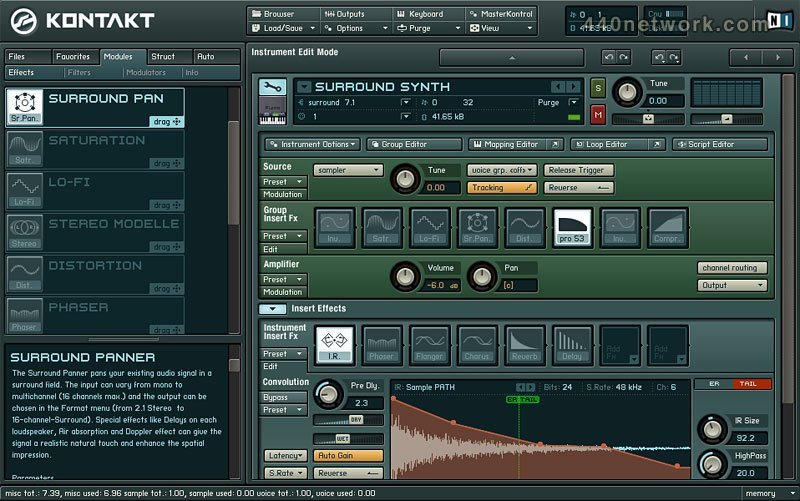
Surround Sound:
Up to 16 channel surround sound (all formats)
Innovative surround sound panner with a flexible output configuration
Imports WAV/AIFF surround samples (1-16 channels)
Surround optimized effects
Convenient mixer for the multi-channel output configuration of individual instruments (see output section)
Audio Engine:
New, high-performance audio engine with unlimited voices and 64 fold multi-timbrality per instance
RAM-saving "Sample Purge" function, allowing samples not being used in the arrangement to be removed from the RAM
Multiprocessor and AltiVec support ensuring top performance
Custom Modules, Filters and Effects:
KONTAKT Script Processor: Program individual modules using a simple script language. Create ingenious instruments with the scripts already included in the library; for example exotic instrument simulations, authentic piano pedal simulators, chord generators, arpeggiators, dynamic tuners and much more. Up to 5 script processors simultaneously per instrument are possible.
Convolution effect delivering authentic, real-life reverb and special effects. Includes a wide selection of impulse responses from real concert halls, echo chambers and more. Other impulse responses can also be imported.
Two additional synthesizer filters: PRO-53 filter (classic analog) and the 4-Stage Ladder filter (modelled on one of the most popular 3 oscillator synthesizers).
New multi-effect modules (located in the group insert, insert effect and send effect sections) allow a particularly easy and space-saving combination of up to 8 effects per module. Effects can be arranged in any order desired and multiple instances of the same effect are also possible.
Browser:
Powerful Multi-Browser with dozens of convenient functions:
1. File Browser: covering the entire hard drive and includes an import context menu
2. Database/Favorites Browser: for frequently used folders in the following caregories: samples, instruments, multi-instruments, banks (128 instruments). A powerful search feature is also included
3. Module Browser: browse, select, drag and drop effects, filters, internal and external modulators as needed. Detailed module descriptions are also displayed.
4. Automation Management: Manages MIDI and host automation
Mapping, Looping and Group Management :
Enhanced loop editor with simplified loop slicing functionality. Multi-channel compatibility allowing surround samples with up to 16 channels to be displayed.
REX/Apple loops including slice information are supported.
An even more helpful mapping editor with an additional list view
New group editor allowing sample groups to be assigned and organised easily. Group settings can be copied onto other groups and into other instruments.
Output Configuration
Global Mixer controlling the volume of all instruments and allocation of output channels. Up to 4 additional Aux Effects per output configuration
New Instrument Library
KONTAKT 2 includes a comprehensive sample library overflowing with top-quality instruments: a selection of orchestra instruments taken from the exceptional Vienna Symphonic Library, an excellent grand piano, authentic electric pianos, acoustic instruments, electronic as well as acoustic drum kits, drum and instrument loops and a whole lot more. Furthermore, the library also contains several instruments that make specific use of the revolutionary KONTAKT Script processor. For example, guitar and orchestra instruments that emulate particular playing styles with unprecedented precision.
Kontakt v 1.5
Jan 22, 2004
MacOS X PPC
New Functions:
Sync Loops to Song Tempo: Beat Machine
KONTAKT 1.5 integrates a newly developed Beat Machine, which makes it possible to take finished loops and divide them into individual slices. With Beat Machine drum loops can be perfectly synced to the host sequencer – without losing any of the sound. KONTAKT 1.5 also supports the REXTM sample format for loading already sliced loops.
Time Stretching: Time Machine II
The Time Machine for real time pitch shifting and time stretching has been further developed and improved for KONTAKT 1.5. The result is Time Machine II, which in version 1.5 is available in addition to the original Time Machine from KONTAKT 1.2. Time Machine II offers better sound quality when time stretching and pitch shifting samples. The integrated "Transient Copy" technology allows for a much more authentic reproduction of a sample's attack phase, which isn't only advantageous when working with drum loops. The sonic behavior of the Time Machine II can be individually configured and adjusted for different output material.
Tempo Synchronization of Loops
Another especially high-performance feature of Time Machine II is the ability to use time stretching to sync drum loops to the tempo of the host sequencer. In this way loops with different original tempos can be inserted into any song arrangement.
Accelerated Sample Analysis
Before the Time Machine goes into action all loaded samples undergo an exact analysis. This analysis happens considerably faster than in the original Time Machine – with a fast CPU the per-sample analysis takes less time than the length of the sample itself.
Convenient Plug-In Integration: VST Automation
In addition to the MIDI automation in version 1.2, KONTAKT 1.5 now also supports VST automation. This allows for much more convenient integration with VST-compatible host sequencers. Nearly all control element movements can be drawn as automation curves in the sequencer and remote-controlled. Since KONTAKT is semi-modular, a VST automation number can be quickly and easily assigned to any KONTAKT control element.
New Import Formats:
KONTAKT 1.5 further expands its compatibility to professional sample formats: the new version can now import REX , EXS MK II and Samplecell (Digidesign) as well. Version 1.5 can also load the libraries of KOMPAKT and INTAKT.
Drag and Drop From Finder and Desktop
Extended drag and drop functionality further enhances the workflow with KONTAKT. Drag and drop support is now no longer limited to the KONTAKT browser: files and instruments can also be dragged and loaded directly into KONTAKT from the desktop, from folders and from the finder or file explorer.
Locking Zones
A convenient feature has been added to the mapping editor: zones can be locked to prevent them from being accidentally shifted.
Fine-Control of Master Tuning
The master tuning in the options dialog can now be altered in detailed steps of +/- 200 cent – perfect for individual voices.
Solo Latch, Solo In Place
With Solo Latch and Solo in Place in the options dialog you can set the behavior of the solo buttons in the individual KONTAKT racks. With Solo Latch several instruments can be switched to solo at once, while Solo In Place lets only one instrument be switched to solo at time.
less...


 Windows


You must sign-in to post your comment:
You can signin with your 440Software account (MacMusic, PcMusic, 440TV, 440Forums, 440Software, ...) or via FaceBook, Twitter or Google.