 MachFive v 2.0
Jul 20, 2007
MacOS X UB
MachFive v 2.0
Jul 20, 2007
MacOS X UB
Universal Compatibility
Available in all major plug-in formats for Mac OS X and Windows, plus as a standalone application. Run MachFive 2 cross-platform on your G5 or Intel Mac, or on the latest Windows PC with 32 and 64 bit XP or Vista.
Universal Sound Management
MachFive 2 effortlessly handles samples and synthesis, loops and instruments. Use the includes 32 GB of sounds, or load third-party sounds natively without conversion. Umlimited parts mean you'll always have room for more, and with disk streaming you can manage them with ease.
Advanced editing that retains simplicity
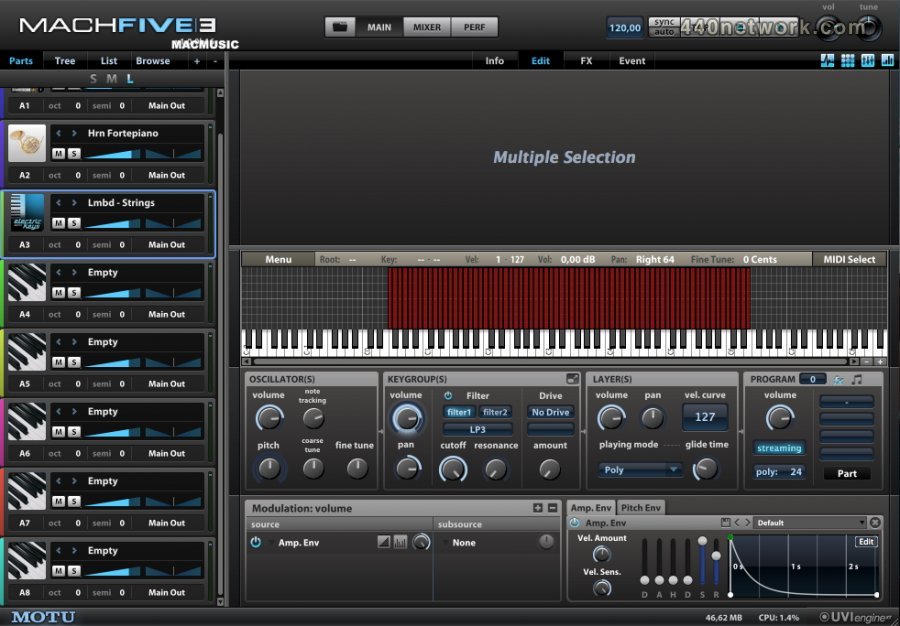
With its simple one-window design, MachFive 2 keeps everything in your reach, yet provides deep editing tools. Easily manage unlimited parts with unlimited keygroups and layers in a single window, using up to 256 MIDI channels and 200 discrete audio outputs (depends on host). Use the new expanded and full screen editors to attend to every detail.
Loop Lab
Drag & drop import/export, beat slicing, MIDI mapping, time stretching, and advanced pitch shifting take your loops to the next level.
Layers and Rules
Layers add a whole new dimension to your sounds. Organize, sort, and stack your sounds, and create dynamic performances using Layer Rules. Third-party multi-dimension formats like Gigasampler load effortlessly with all of their rules.
Mixer
MachFive 2's Mixer view provides the tools for a comprehensive mixdown environment. Quickly adjust levels, panning, audio outputs, MIDI inputs, add FX, and configure aux sends for multiple parts.
FX
Use dozens of effects ranging from pristine convolution reverb to gritty distortion to multi-band processors, with hundreds of included presets or your own. Graphical control for plug-ins makes finding that perfect setting easy. Save up to four effects in a single preset with multi FX for quick recall.
Advanced Sound Design
MachFive 2's sound design is powerful, yet intuitive and easy to use. Adjust all keygroups with one move, or create unique settings for every keygroup. Take advantage of filters, LFOs, AHDSR and mult-point envelopes, FX, and much more to careful craft your sound. And with MIDI automation and modulation for nearly every parameter, the depth of control is staggering.
Multi-point envelopes
Multi-point envelopes with unlimited breakpoints allow for highly customizable modulation. Sync your envelopes to your host tempo, and save & recall presets of favorite envelopes.
Synthesis
MachFive 2 seemlessly combines samples and synthesis in a unified environment. Use traditional oscillators (sine, saw, square, and more) or an advanced organ emulator.
Surround
Edit multi-channel samples and loops and place your sounds in a surround environment from quad to 5.1 up to 7.1, for a truly immersive experience.
 MachFive v 1.2.3b
Sep 14, 2005
MacOS X PPC
MachFive v 1.2.3b
Sep 14, 2005
MacOS X PPC
This update provides Tiger OSX 10.4 compatibility for ProTools format plug-ins (HTDM & RTAS) under OSX. This public beta update is also backward compatible to OS 10.3.9.
MachFive v 1.2.2b1
Apr 30, 2005
MacOS X PPC
Tiger compatibility
Attention Logic users: MachFive 1.22 public beta is not yet compatible with Logic 7.01 under Tiger.
MachFive v 1.21b1
Mar 16, 2005
MacOS X PPC
This is a public beta (pre-release) of MachFive 1.21 pending the final update of MachFive 1.21. This pre-release update contains update versions of the MachFive AudioUnit and VST plug-ins. The AU addresses compatibility with Logic 7's new AU validation process, and the VST adds compatibility with Ableton Live and Max/MSP.
MachFive v 1.2
Jun 27, 2004
MacOS X PPC
Adds streaming functionality : Disk streaming is a new feature that allows you to load very large
samples (or presets that consist of very large samples) into MachFive, even if the samples are larger than the amount of free memory (RAM) available in your computer. Rather than loading
the entire large sample into RAM, MachFive reads the sample from the computer hard drive as the sample is being played. This allows MachFive to play presets a large as a Gigabyte (GB) of
sample data or more.
less...


 MacOS X Intel
 Windows


You must sign-in to post your comment:
You can signin with your 440Software account (MacMusic, PcMusic, 440TV, 440Forums, 440Software, ...) or via FaceBook, Twitter or Google.